How to Clean JBL Earbuds Easily and Safely
Keeping JBL earbuds clean helps maintain sound quality and hygiene. This guide covers practical, user-friendly steps to clean in and around the earbuds without damaging delicate components. It also shares product-aligned tools to streamline the process and protect your investment.
Quick Answer
Use a soft brush or microfiber cloth to gently remove debris, followed by a dedicated cleaning kit for stubborn grime. Avoid excessive moisture and never submerge wireless earbuds. For best results, use approved tools designed for earbuds and replace foam or silicone tips as needed.
What You’ll Need
- Earbud cleaning brush set
- Earbud cleaning kit with microfibre cloth
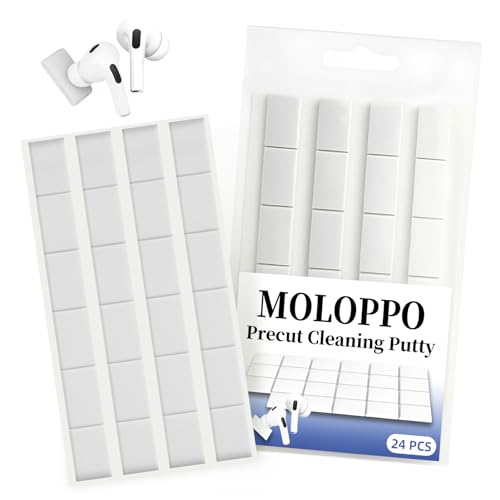
- Electronics cleaning putty kit for earbuds

Before You Start
Before cleaning, ensure the JBL earbuds are powered off and disconnected from devices. Remove any detachable tips if applicable. Work in a well-lit, clean area to avoid losing small parts. Avoid liquid exposure on charging contacts or internal electronics, and never use harsh solvents. Estimate cleaning time: 5–15 minutes per session, depending on buildup.
Step-By-Step: How To Clean JBL Earbuds
- Remove tips and place them in a separate container for cleaning or replacement.
- Gently wipe the exterior with a dry microfiber cloth to remove surface dust.
- Use a soft cleaning brush to dislodge debris around grills and seams.
- For stubborn grime, apply a tiny amount of dampened cloth to the exterior and wipe away residue.
- Apply electronics cleaning putty kit for earbuds to lift dirt from crevices without pushing it deeper.
- Clean the tips separately with mild soap and water, then air-dry completely before reattaching.
- Wipe charging contacts with a dry cloth if you notice corrosion or buildup, avoiding moisture.
- Reassemble tips and confirm the earbuds power on and connect properly after drying.
Troubleshooting
| Symptom | Likely Cause | Fix | Prevention |
|---|---|---|---|
| Reduced sound quality | Debris in grills | Clean grills with brush; use putty to lift hard grime | Regular gentle cleanings |
| Moisture after cleaning | Over-wetting tips | Air-dry fully; avoid soaking components | Use minimal moisture and dry tips thoroughly |
| Uneven battery performance | Moisture on contacts | Dry contacts with cloth; inspect for corrosion | Keep dry and wipe contacts after use |
| Tips detached or loose | Worn or dirty tips | Replace tips; clean connector area | Handle tips gently and store properly |
Common Mistakes
- Using excess liquid or submerging earbuds
- Forcing debris out of tiny crevices with sharp objects
- Ignoring drying time after cleaning
- Skipping tip replacement when worn
Keeping a light cleaning routine prevents buildup and prolongs lifespan. Regular maintenance reduces the need for intensive sessions.
Tips For Best Results
- Perform a quick wipe after each use to minimize buildup.
- Use a dedicated cleaning kit designed for electronics to avoid damage.
- Let tips and components dry completely before reinstalling.
- Store earbuds in a protective case to limit dust exposure.
Call A Professional
Stop cleaning if you notice moisture intrusion into the charging contacts or internal components. If sound issues persist after cleaning, or if corrosion appears, contact a licensed service center or JBL support for evaluation and potential repairs.
FAQ
Can I clean JBL earbuds with water?
Only the exterior should be wiped with a lightly dampened cloth; avoid submerging or soaking any internal parts.
How often should I clean my JBL earbuds?
Clean lightly after every few uses; perform a deeper clean monthly or when you notice buildup.
Are there any materials to avoid for cleaning?
Avoid harsh solvents, alcohol on delicate coatings, and abrasive tools that can scratch surfaces.
Should I remove the tips before cleaning?
Yes, remove tips to clean both the tips and the housing thoroughly, and replace worn tips as needed.
Buying Guide
When choosing cleaning tools for JBL earbuds, consider size and compatibility:
- Size and fit: Ensure brushes and cloths are small enough to navigate grills and seams without forcing material inside.
- Noise level: Cleaning tools should be silent to prevent distraction and avoid moisture transfer to sensitive parts.
- Energy efficiency: Not directly relevant to cleaning; choose low-waste, reusable tools to reduce waste.
- Controls and accuracy: Fine-tuned tools help reach tight areas without damage.
- Placement: Store cleaning kits in a dedicated, dry place away from heat and direct sunlight.
Compare kits by included components, compatibility with your earbud model, and the presence of microfiber cloths or putty designed for electronics. A complete kit with multiple brushes and a microfiber cloth simplifies maintenance, while putty helps lift embedded grime without pushing debris deeper. Consider durability, ease of use, and replacement parts when evaluating options.
Leave a Reply