How to Clean iRobot Filter Effectively
Maintaining clean filters on an iRobot Roomba helps sustain suction, extend battery life, and keep surfaces free of dust. This guide provides practical steps to clean the filter and maintain performance without damaging components.
Quick Answer
To clean an iRobot filter, remove the filter from the dustbin, brush away loose debris with a dedicated cleaning brush, rinse if the filter is washable, let it dry completely before reinstalling, and replace if it shows wear or is past the recommended lifespan.
What You’ll Need
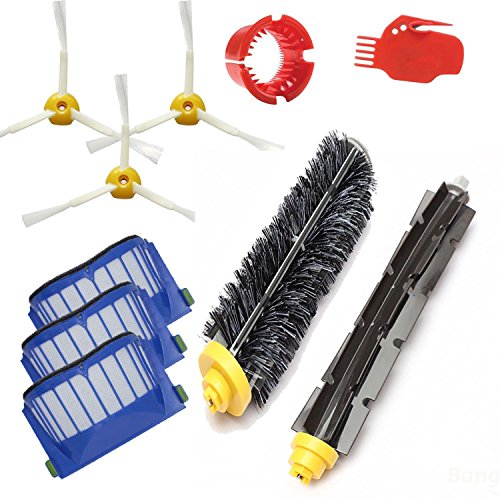
- iRobot Roomba filter cleaning brush
- Roomba replacement filters 600 700 800 series
- Roomba HEPA filter cleaning kit


Before You Start
Disconnect the Roomba from charging and power off the robot. Work on a clean, flat surface to avoid losing small parts. Avoid using heat or harsh chemicals on filters, as this can damage the material. Dry filters thoroughly before reinstalling to prevent mold growth. Time estimates vary: 5–15 minutes for routine cleaning; 20–30 minutes if you replace filters.
Step-By-Step: How To Clean iRobot Filter
- Power off the Roomba and remove it from the dock.
- Open the dustbin and take out the filter assembly carefully.
- Use the iRobot Roomba filter cleaning brush to dislodge loose dust from the filter surface.
- Gently tap the filter to release embedded debris, aiming to avoid tearing the material.
- Inspect the filter for tears or significant wear; if damaged, replace with a new one from the Roomba replacement filters 600 700 800 series.
- If the filter is washable (check the product packaging), rinse under cool running water until clear. Do not use soap or detergent.
- Shake off excess water and lay the filter on a dry towel in a well-ventilated area to air dry completely (24 hours recommended if possible).
- Reinstall a dry filter into the dustbin, then snap the dustbin back into the Roomba body.
- Run a short cleaning cycle to ensure the filter seats correctly and the Roomba operates normally.
- If using a Roomba HEPA filter cleaning kit, follow kit-specific instructions for maintenance and replacement intervals.
- Schedule regular filter checks every few weeks, more often in homes with pets or high dust levels.
- Keep spare filters handy to ensure quick replacements when needed.
Troubleshooting
| Symptom | Likely Cause | Fix | Prevention |
|---|---|---|---|
| Roomba won’t pick up debris after cleaning the filter | Filter not seated properly | Remove and reseat filter securely | Check alignment during reassembly |
| Strong odor from Roomba after cleaning | Dirty or moldy filter | Replace with a fresh filter | Dry filters completely; replace regularly |
| Filter looks torn or frayed | Wear and tear | Install a new replacement filter | Keep spare filters on hand |
| Roomba runs but suction is weak | Clogged filter or dustbin | Thoroughly clean or replace filter | Regular maintenance schedule |
Common Mistakes
- Using hot water or detergents to clean filters
- Not letting the filter dry completely before reinstalling
- Cleaning with excessive force, causing material damage
- Ignoring wear indicators and continuing to use worn filters
Tips For Best Results
- Establish a routine: check and clean the filter every 2–4 weeks, depending on usage.
- Label replacement dates to track filter lifespan—do not extend beyond recommended intervals.
- Keep a small cleaning brush accessible near the charging station for quick maintenance.
- Utilize the Roomba HEPA filter cleaning kit for enhanced maintenance if available.
Call A Professional
Contact a professional if Roomba shows persistent errors beyond filter maintenance, if the unit sustains water exposure, or if there is significant mechanical damage. Seek help immediately if the robot emits unusual noises, fails to power on, or experiences recurring malfunctions after filter changes.
FAQ
Can I wash the Roomba filter?
Some filters are washable; if so, rinse with cool water only and allow to fully dry before reinstalling.
How often should I replace Roomba filters?
Replacement frequency depends on usage, but typical guidance is every few months or when wear is visible.
What about the Roomba replacement filters 600 700 800 series?
These are compatible replacement filters designed for specific Roomba models in the 600–800 series.
Is a HEPA filter cleaning kit worth it?
For households with allergies or pets, a HEPA filter cleaning kit can help extend filter life and maintain air quality.
Buying Guide
When choosing filters and accessories for an iRobot Roomba, consider size compatibility with your model (600, 700, 800 series, etc.), the filter type (standard vs. HEPA), and replacement frequency. Noise level, energy efficiency, and the presence of smart scheduling controls influence overall performance. Look for kits that bundle a cleaning brush, replacement filters, and a HEPA option for comprehensive maintenance. Placement matters: store replacement filters in a dry area away from direct sunlight to prevent material degradation. Compare options by how easily they install, how well they trap dust, and how frequently they need replacement.
Leave a Reply