How to Stop Speaker Buzz: Quick Fixes for Clean Sound
Speaker buzz can be caused by multiple factors, from ground loops to dirty contacts. This practical guide walks through safe, step-by-step methods to reduce or eliminate buzz across home theater setups and car audio alike. Readers will find actionable checks, tools, and best practices tailored for American homes and vehicles.
Following these steps helps protect equipment, minimize interference, and restore clear audio without professional intervention when avoidable.
Quick Answer
Start with a simple ground loop check and clean exposed contacts. If buzz persists, test with a ground loop isolator for car audio or home theater, then tighten or re-seat connections using a precision screwdriver set. If interference remains, isolate the source by temporarily unplugging devices one by one.
What You’ll Need
- Ground loop isolator for car audio or home theater
- Electronic contact cleaner spray for switches and potentiometers
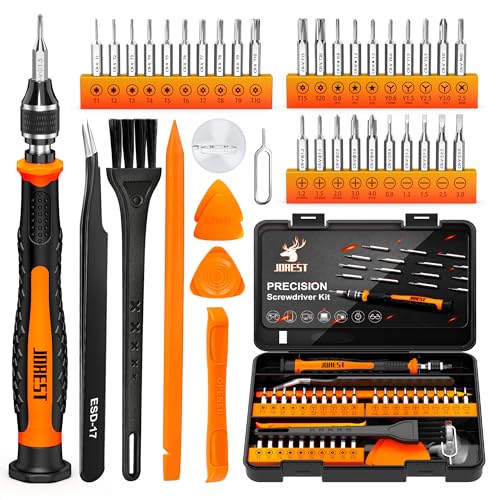
- Precision screwdriver set electronics repair


Before You Start
Plan a work area with dry, static-free surfaces. Power down and unplug all equipment before testing connections. Use one-at-a-time testing to identify the noise source. Be cautious with liquids near electronics and avoid spraying cleaner directly onto connectors that may short. Time estimate: 20–40 minutes for a typical setup.
Step-By-Step: How To Stop Speaker Buzz
- Power off and unplug the audio system from the wall outlet. Remove speakers if possible to test in isolation.
- Check all interconnects for secure seating. Reseat RCA, 3.5mm, or speaker wires firmly and evenly.
- Ground the system where applicable. If the device has a grounding option, ensure a proper earth connection and avoid shared power strips with other high-amp devices.
- Test with a different input source. If the buzz moves with the source, the problem is upstream; if it stays, the issue is in the amplifier or speaker wiring.
- Apply electronic contact cleaner spray to switches, volume pots, and input selectors. Spray lightly and rotate knobs to distribute cleaner; allow to dry completely.
- Inspect power cables for damage or fraying. Replace damaged cables; try a different power outlet or circuit if possible.
- If the system is a car audio setup, install a ground loop isolator between the head unit and amplifier to break the loop and reduce hum.
- Reassemble and power up the system. Listen for changes in buzz intensity as connections are re-energized.
- Isolate the source by disconnecting one device at a time. If the buzz disappears when a particular component is removed, that device is likely the culprit.
- Test with and without any external accessories (soundbars, subwoofers, or power conditioners) to identify cross-talk.
- Document findings and repeat any steps if new buzz patterns emerge after adjustments.
Troubleshooting
| Symptom | Likely Cause | Fix | Prevention |
|---|---|---|---|
| Buzz when turning volume up | Dirty potentiometer | Clean with electronic cleaner; rotate knob during application | Regularly clean control surfaces |
| Buzz only with certain sources | Ground loop or source impedance | Check grounding; try isolator or different input | Use proper grounding practices |
| Buzz persists after rearranging cables | Interference from nearby power lines or devices | Move cables away from power supplies; use ferrite cores | organize cable layout |
| Buzz appears when car engine runs | Car electrical system ground | Install ground loop isolator; check vehicle ground | Professional vehicle audio grounding check |
Common Mistakes
- Spraying cleaner directly on connectors without allowing proper drying time
- Ignoring power-down safety and testing while equipment is plugged in
- Rushing to replace components without confirming the actual source
- Overlooking grounding issues in multi-component setups
Careful diagnosis and methodical testing prevent unnecessary replacements and keep audio systems humming cleanly.
Tips For Best Results
- Keep cables tidy and avoid coiling long power cords near signal cables to reduce interference.
- Use shielded interconnects for sensitive audio paths when available.
- Space amplifiers away from other electronics that emit electromagnetic noise.
- Periodically inspect connectors for corrosion or wear and replace as needed.
Call A Professional
Seek professional help if: the buzz persists after all internal cleaning and re-seating, you suspect a damaged amplifier circuit, or you are uncomfortable working with high-amp car audio installations. If a strong electrical burn smell, heat, or sparking occurs, stop immediately and unplug the system.
FAQ
What causes speaker buzz the most?
Common causes include ground loops, dirty potentiometers, and loose or corroded connections.
Can I fix buzz without replacing parts?
Yes, many buzz issues are resolved through cleaning, re-seating connections, and grounding adjustments.
Is a ground loop isolator safe for home theaters?
Yes, ground loop isolators are designed to break the loop and reduce hum in many setups.
Will cleaning switches fix all noises?
Cleaning helps with contact noise, but persistent buzz may require checking power, grounding, or equipment health.
Buying Guide
When selecting gear to prevent or fix speaker buzz, consider several factors:
- Ground loop isolator: Look for compatibility with your car audio or home theater connections (RCA, 3.5mm). Ensure the device is rated for the expected signal levels and supports your audio formats.
- Electronic contact cleaner spray: Choose a non-residue formula that evaporates quickly and is safe for plastics and delicate contacts. Use sparingly.
- Precision screwdriver set: A well-rounded set with insulated handles, magnetized tips, and a range of micro sizes helps reach tiny electronics screws without stripping.
- Measure and plan: Before purchasing, map your setup’s cable paths and identify potential interference sources such as power strips, fans, or other electronics.
- Placement and isolation: Position amplifiers and receivers away from heat sources and on stable, vibration-free surfaces to minimize mechanical buzz.
How should you compare products? Consider build quality, connector compatibility, ease of use, and user reviews. Do you need a car-specific solution or a universal home theater fix? A small, targeted approach often yields faster, more reliable results than sweeping changes across the entire system.
Leave a Reply