How to Clean Your Phone Charging Port Without a Toothpick
Over time, lint, dust, and pocket debris can accumulate in a smartphone charging port, leading to slower charging or intermittent connections. This guide provides practical, safe methods to clean a charging port without using a toothpick, focusing on gentle tools you already have or easy-to-find accessories.
Safety first: always power off your device before cleaning, and avoid forcing debris or applying liquids directly into the port. Use non-conductive tools and keep electronics away from moisture to prevent damage.
Quick Answer
For a quick, safe clean, use a soft, anti-static brush or a compressed air nozzle to dislodge debris. If stubborn particles remain, switch to a micro brush or a dedicated USB-C port cleaning tool kit, then finish with a gentle air blast. Never insert metal objects into the port.
What You’ll Need
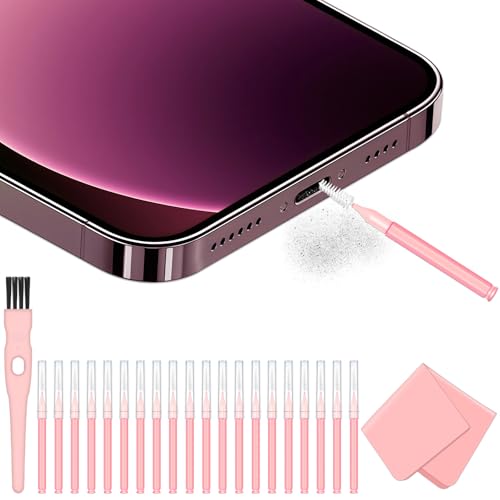
- Phone charging port cleaning brush anti-static soft bristle
- USB-C port cleaning tool kit micro brush pick air blower
- Compressed air duster with precision nozzle for mobile charging port


Before You Start
Prepare a clean, well-lit workspace. Power off the phone and unplug any connected cables. If your device has a waterproof rating, avoid moisture near openings. Start with the least invasive method and proceed gradually. Do not insert metal objects, and stop if you feel resistance or hear a crackle when using air.
Estimated time: 5–15 minutes depending on debris. If you notice charging issues persist after cleaning, consider professional inspection.
Step-By-Step: How To Clean Your Charging Port Without A Toothpick
- Power off the device and disconnect all cables.
- Inspect the port with good lighting to identify visible debris.
- Gently brush the port with an anti-static soft-bristle cleaning brush to lift lint.
- Apply a short, controlled puff of compressed air from the precision nozzle to loosen particles.
- Insert a micro brush gently into the port and rotate to sweep out stubborn debris.
- Repeat brushing and air blasts in short, controlled bursts until debris clears.
- Re-check the port with a flashlight to confirm it is clean and free of loose material.
- Reconnect the charging cable and test charging. If it’s intermittent, repeat once more.
- Store cleaning tools in a protective case and avoid repeated aggressive cleaning.
- If issues persist, consider professional diagnosis or a port replacement if needed.
Troubleshooting
| Symptom | Likely Cause | Fix | Prevention |
|---|---|---|---|
| Phone won’t charge | Debris blocking the port | Clean using soft bristle brush + compressed air | Clean regularly to prevent buildup |
| Charger connects but charges slowly | Dust accumulating in port | Clear port as described | Keep port clean; avoid sand/crumbs near pocket |
| Connection is intermittent | Partial debris or bent pins | Carefully re-clean; inspect for damage | Avoid inserting objects that can bend pins |
| Port feels loose | Wear or damage | Consult a professional | Handle connect/disconnect gently |
Common Mistakes
- Using metal tools or pins that can scratch or short the port
- Blowing air too aggressively, which can push debris further inside
- Relying on liquids that can seep into connectors and cause corrosion
- Rushing the process or forcing debris out instead of lifting it softly
Tips For Best Results
- Work in a well-lit area and use a magnifying glass for a closer look at the port.
- Opt for anti-static brushes to minimize static discharge near sensitive components.
- Test cleaning steps with a USB-C cable after each pass to gauge progress.
- Store cleaning tools clean and dry; wipe brushes after use to remove collected dust.
Call A Professional
Seek professional help if you notice bent pins, corrosion, or if the device still refuses to charge after cleaning. Stop cleaning and consult a technician if you smell burning plastic, observe discoloration, or hear abnormal sounds during charging.
FAQ
Can I use a toothpick to clean my charging port?
No. A toothpick can scratch or damage the delicate contacts and push debris deeper into the port.
What tools are safe for cleaning a charging port?
Soft, anti-static brushes, micro-brush picks, and compressed air with a precision nozzle are safe options when used gently.
Is compressed air safe for all devices?
Yes when used in short bursts and from a safe distance; avoid prolonged use and never spray liquid propellants near electronics.
What if cleaning doesn’t fix the charging issue?
There may be hardware damage or a faulty cable; test with multiple cables and consider a professional diagnostic.
Buying Guide
When choosing tools to clean a charging port, consider size, compatibility, and ease of use. The goal is to remove debris without risking damage to the port or internal components. Here are factors to weigh:
- Size and compatibility: Select tools compatible with your device’s port type (USB-C, Lightning, etc.).
- Noise level and ease of use: For frequent cleaning, choose compact tools that are comfortable to handle.
- Energy efficiency and materials: Rely on non-conductive, anti-static materials to prevent shorts.
- Controls and precision: A precision nozzle or micro brush offers controlled cleaning without overreach.
- Port placement considerations: Some devices have recessed ports; tools with thin profiles and flexible tips can help.
- Port protection: Use brush heads with soft bristles to minimize contact force and reduce risk of damage.
For best results, combine a soft-bristle brush with a compressed air approach and a dedicated cleaning kit designed for phone ports. If unsure, start with gentler methods and monitor the port’s response. Would you like recommendations tailored to your device type and port?
Leave a Reply