How to Clean Lucite Surfaces Safely and Effectively
Lucite, a clear acrylic often used in furniture, displays, and signage, can retain clarity with proper cleaning. This guide provides practical, step-by-step methods using common supplies and specific products designed for acrylic and Lucite surfaces.
Readers will learn safe cleaning techniques, common pitfalls, and how to address scratches or cloudiness without damaging the material.
Quick Answer
Use a mild, non-ammonia cleaner formulated for acrylic or Lucite, paired with a soft microfiber cloth. Gently wipe with straight, overlapping strokes, then rinse or wipe dry. For stubborn residues, apply a dedicated acrylic cleaner spray for Lucite surfaces and buff with a clean microfiber cloth. Avoid abrasive pads and strong solvents that can dull or scratch the surface.
What You’ll Need
- Acrylic cleaner spray for Lucite surfaces
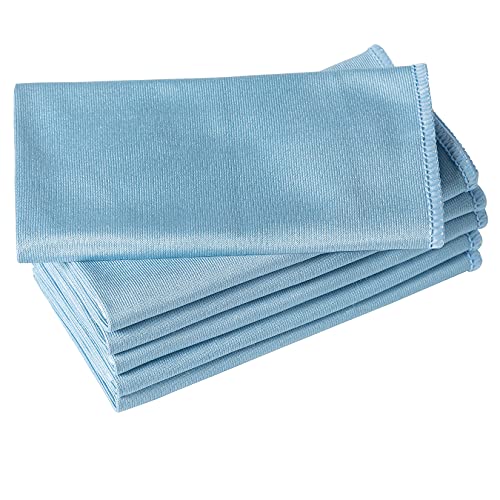
- Microfiber cloth for cleaning acrylic Lucite
- Plastic scratch remover kit for Plexiglass Lucite acrylic


Before You Start
Clear the area and lay down a soft, non-abrasive surface to work on. Test cleaners on a small, inconspicuous area first to ensure no discoloration occurs. Use lukewarm water for rinsing when possible, as hot water can warp some Lucite pieces. Protect surfaces around the cleaning area from splashes and avoid placing liquids near electronics unless advised by the manufacturer.
Time estimate: roughly 15–30 minutes for a typical cleaning session, longer if polishing or dealing with scratches.
Step-By-Step: How To Clean Lucite Surfaces
- Dust the surface with a dry microfiber cloth to remove loose debris and prevent scratching during cleaning.
- Apply a small amount of acrylic cleaner spray for Lucite surfaces to a fresh microfiber cloth or spray lightly directly onto the cloth, not the surface.
- Wipe with smooth, straight strokes from one end to the other; avoid circular motions that can spread grime into micro-scratches.
- For stubborn spots, reapply a small amount of cleaner and allow it to sit for a moment before wiping again.
- Rinse or wipe away any residue with a clean, damp microfiber cloth to prevent streaks.
- Dry the surface with a dry microfiber cloth, ensuring no moisture remains in seams or edges.
- If cloudiness or minor scratches remain, use a plastic scratch remover kit for Plexiglass Lucite acrylic following the kit’s instructions, typically with light, circular buffing motions.
- Polish with a clean microfiber cloth to restore clarity and maximize shine.
Troubleshooting
| Symptom | Likely Cause | Fix | Prevention |
|---|---|---|---|
| Cloudy or streaky surface | Old residue or hard water deposits | Use a dedicated acrylic cleaner spray and microfiber buffing | Wipe with clean cloth, dry thoroughly after cleaning |
| Scratches appear more noticeable | Abrasion from harsh cleaners or pads | Switch to soft cloths and use a plastic scratch remover kit per instructions | Avoid abrasive pads, never scuff with rough materials |
| Discoloration near edges | Improper drying or chemical reaction | Rinse well and dry completely; test cleaners first | Stick to recommended acrylic cleaners |
| Streaks after drying | Residual cleaner or water spots | Buff with a dry microfiber cloth | Dry surfaces in a dust-free environment |
Common Mistakes To Avoid
- Using ammonia-based cleaners on Lucite, which can cause crazing or hazing
- Rubbing aggressively with rough cloths or pads
- Skipping a final buff or dry to remove streaks
- Applying cleaner directly to the surface in excess, leading to pooling and residue
Sticking to the recommended products and gentle techniques helps preserve clarity and extends the life of Lucite surfaces.
Tips For Best Results
- Work in a shaded area to prevent cleaner from drying too quickly and causing streaks.
- Use a dedicated microfiber cloth for initial cleaning and another clean cloth for polishing to avoid cross-contamination.
- For heavily stained or opaque areas, repeat the cleaning process in small sections to maintain uniform appearance.
- Store cleaners in a cool, dry place and keep away from direct sunlight to maintain their effectiveness.
Call A Professional
Seek professional help if Lucite surfaces display deep scratches, crazing, or yellowing that does not respond to standard cleaning or scratch removal treatments. If the item is valuable, antique, or has critical optical clarity, professional refinishing may be the best option to prevent further damage.
FAQ
Can I use window cleaner on Lucite?
Most window cleaners contain ingredients that can haze or dull Lucite over time; use an acrylic-specific cleaner instead.
Is it safe to use a microfiber cloth for heavy cleaning?
Yes, microfiber is ideal for Lucite because it lifts debris without scratching the surface.
How often should Lucite be cleaned?
Light cleaning once a week or as needed, with a deeper clean monthly or as dirt accumulates.
Will a scratch remover kit fix all scratches?
It can improve minor to moderate scratches but may not repair deep gouges; test on an inconspicuous area first.
Buying Guide
When selecting products to clean Lucite, consider size, ease of use, and compatibility with acrylic materials. Key factors include:
- <bSize and shape: Choose products that match the surface area and form of the Lucite item to avoid waste.
- <bNoise level and ease of use: Opt for user-friendly spray bottles and cloths that minimize pretreatment time.
- <bEnergy efficiency: Not directly applicable to cleaners, but consider efficiency of spray bottles and buffing tools to reduce effort and time.
- <bControls: Look for simple spray-and-wipe systems or kit-based approaches with clear instructions.
- <bPlacement: If cleaning multiple pieces (screens, displays, furniture), plan a dedicated, ventilated workspace to avoid cross-contamination.
Shopping perspective: compare products by the blend of convenience (spray cleaners), performance (scratch removal capability), and material safety (non-ammonia formulas). If unsure, start with a recommended acrylic cleaner spray for Lucite surfaces and pair it with a soft microfiber cloth for best results.
Leave a Reply