How to Clean Dyson Roller Brush
Dyson vacuum cleaners are renowned for powerful suction and motorized brush bars that lift dirt from carpets. Over time, hair, threads, and debris can wrap around the roller, reducing performance. This guide provides practical, step-by-step instructions to clean the Dyson roller brush safely and effectively, preserving suction and extending the life of the brush bar.
Quick Answer
Remove the brush bar, clear hair with a tool, cut away tangled fibers, and reassemble. Use a dedicated cleaning tool to avoid damaging components, and perform routine maintenance monthly or as needed for high-traffic homes.
What You’ll Need
- Dyson vacuum brush bar cleaning tool kit
- Dyson roller brush cleaning brush
- Dyson vacuum brush bar replacement roller kit
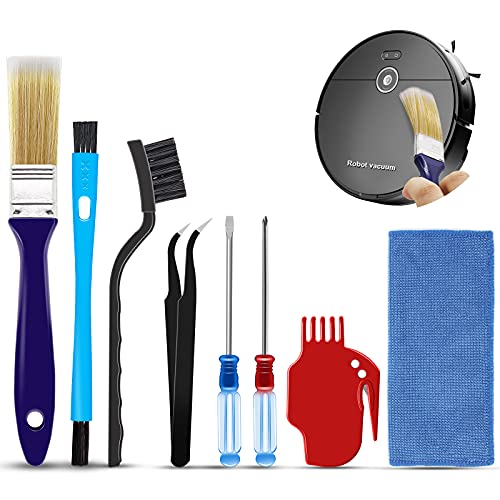


Before You Start
Prepare a clean, well-lit workspace. Unplug the vacuum and ensure the device is cool before handling the brush bar. Have a small bowl or bag handy for collected debris. Take care around sharp edges and moving parts. Estimated time: about 15–30 minutes depending on debris buildup.
Step-By-Step: How To Clean Dyson Roller Brush
- Power off and unplug the vacuum to avoid accidental startup.
- Lay the unit on a stable surface and locate the brush bar intake on the cleaning head.
- Use the roller brush cleaning tool to release hair and threads wrapped around the bar by inserting into the gap and pulling outward.
- Carefully remove the brush bar and place it on a clean work surface.
- Use the Dyson roller brush cleaning brush to comb out stubborn tangles from the brush bristles and from the center shaft.
- Trim long hair or fibers with scissors if needed, working gently to avoid nicking the bristles.
- Check the bearing ends and ensure the bar rotates freely. If stiffness persists, inspect for internal obstructions.
- Reinstall the brush bar, aligning any alignment notches, and secure it according to the model’s instruction.
- Power on briefly to confirm smooth rotation and suction recovery. Listen for any unusual noises that could indicate debris still inside.
- Test on a small section of carpet to verify cleaning efficiency and proper brush motion.
- Periodically inspect for wear; if bristles appear matted or the bar shows signs of excessive wear, consider replacement.
Troubleshooting
| Symptom | Likely Cause | Fix | Prevention |
|---|---|---|---|
| Brush bar won’t spin | Debris stuck in bearing or misaligned brush | Remove brush, clean bearings, realign, reinstall | Regular cleaning after heavy use |
| Loss of suction after cleaning | Debris left in nozzle or chamber | Inspect chamber, clear debris | Clean head area during maintenance |
| Bristles appear worn or matted | Extensive use or aggressive debris | Replace brush bar using replacement roller kit | Gentle brushing and timely replacement |
| Unusual noises after reassembly | Brush bar contacting casing or misaligned parts | Recheck alignment and clearance | Follow model-specific reassembly steps |
Common Mistakes
- Forgetting to unplug the vacuum before starting maintenance
- Cutting too close to the bristles, shortening brush life
- Forcing the brush bar back in without proper alignment
- Using tools not designed for Dyson brush cleaning, risking damage
Keeping the brush clean reduces clogs and maintains peak performance. Avoid rushing through the steps; precision matters for longevity.
Tips For Best Results
- Perform brush cleanings after heavy shedding seasons to prevent buildup
- Use a wide-tooth comb or the dedicated cleaning brush to avoid bristle damage
- Inspect the debris path for small objects that could hinder rotation
- Store replacement roller kit components in a labeled container for quick maintenance
Call A Professional
Consider professional service if you notice persistent loss of suction after cleaning, persistent unusual noises, or if you suspect motor or bearing damage. Seek expert help for model-specific guidance and to avoid voiding warranties.
FAQ
How often should I clean the Dyson roller brush?
Clean the brush bar whenever you notice hair buildup or after heavy vacuuming days for carpets and pet hair removal.
Can I replace the brush bar myself?
Yes, most models support replacement with a dedicated Dyson vacuum brush bar replacement roller kit and follow the included instructions.
What if the brush bar won’t rotate after cleaning?
Check for internal obstructions, ensure the bar is correctly seated, and verify that the bearings are not damaged.
Are there safety risks when cleaning the brush bar?
Always unplug the vacuum and allow components to cool before handling to prevent injury.
Buying Guide
When choosing a replacement or upgrade for a Dyson roller brush system, consider size compatibility with the vacuum head, the level of bristle stiffness, and the durability of the bar. Look for quiet operation and efficient debris removal, especially on high-traffic carpets. Key buying factors include:
- Size and compatibility: Ensure the replacement roller kit matches the model’s brush width and mounting method.
- Bristle design: Different fibers and stiffness levels impact pet hair pickup and carpet aggressiveness.
- Ease of installation: Choose products with straightforward, tool-free installation or clear instructions.
- Durability and warranty: Higher-quality materials and a solid warranty improve long-term value.
- Noise and vibration: Some rollers are optimized for quieter operation during cleaning.
- Maintenance requirements: Consider how easy it is to clean and replace components over time.
For most households, a dedicated cleaning kit and a replacement roller option offer the best balance of performance and value. If a brush bar shows significant wear or persistent performance issues after cleaning, a replacement may be the best long-term solution.
Leave a Reply