How to Clean Ceiling Fans Safely and Effectively
Ceiling fans collect dust and grime just like any other household surface. Regular cleaning improves air quality, extends motor life, and keeps blades spinning smoothly. This article provides a practical, step-by-step approach suitable for most homes, focusing on simple tools and safe techniques to minimize mess.
Whether you’re refreshing a single room or tackling multiple fans, the goal is to remove dust without scattering debris into living spaces. The following sections cover preparation, a method you can repeat, common issues, and tips to achieve a spotless finish.
Quick Answer
Best starting method: use a microfiber duster with an extendable pole to reach blades from below, then wipe with a microfiber cloth or sleeves. For stubborn grime, apply a light spray cleaner to a cloth or sleeve before wiping. Repeat on all blades and the motor housing, and vacuum surrounding areas to catch falling dust.
What You’ll Need
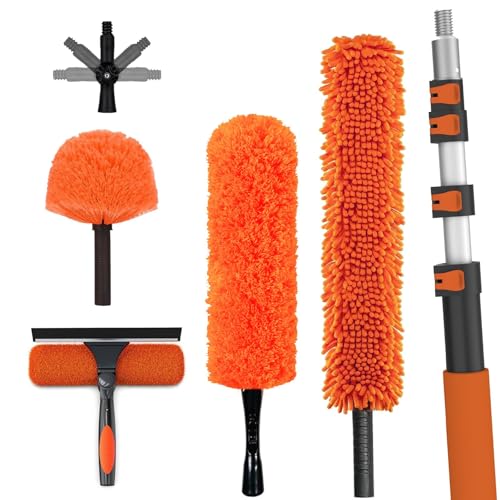
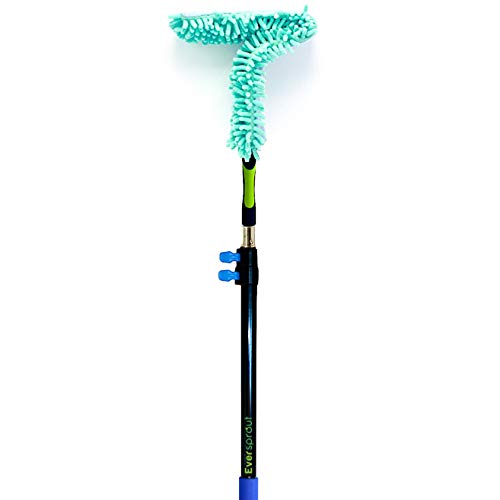
- Ceiling fan cleaning kit microfiber duster with extendable pole
- Extendable ceiling fan blade duster microfiber sleeve
- Ceiling fan blade cleaning spray and microfiber cloth set
- Step ladder or secure stool
- Microfiber towels or old sheets to protect surfaces
- Trash bag or container for dust collection

Before You Start
Prepare the workspace by turning off the fan and the light switch for safety. If the blades are high, use a stable ladder and have a helper nearby. Lay down a drop cloth or old sheet to catch falling dust and prevent surface marks. Wear eye protection if dust is a concern and avoid using oil-based cleaners that can attract more grime over time. Allow the fan to cool for a few minutes if it has been running, especially on metal blades. Estimate 15–30 minutes for a typical single fan cleaning, longer for multiple fans.
Step-By-Step: How To Clean Ceiling Fans
- Power off the fan and confirm the blades have stopped moving. Place a cloth on the blade underside to catch dust as you begin.
- Use the ceiling fan cleaning kit microfiber duster with extendable pole to reach blades from below. Gently sweep across each blade edge to lift loose dust, working in a uniform direction.
- For stubborn grime near the blade roots, swap to the extendable ceiling fan blade duster microfiber sleeve and wrap the sleeve around a dampened cloth to lift grime without bending blades.
- Spray a light amount of ceiling fan blade cleaning spray onto a microfiber cloth, then wipe each blade surface in long, smooth motions. Avoid overspraying to prevent dripping onto the housing.
- Wipe the motor housing and brackets with a damp microfiber cloth, then dry with a clean towel to prevent moisture from seeping into electrical components.
- Inspect the blades for warping or residue. If needed, repeat the cleaning passes on each blade until surfaces look uniformly clean.
- Replace any protective guards or covers and ensure all screws are snug. Remove dust from nearby light fixtures and surrounding furniture to keep surfaces pristine.
- Turn the fan back on at low speed to check balance. If blades seem unbalanced, reduce speed and inspect mounting hardware for looseness.
- Dispose of collected dust and launder used towels or sleeves per fabric care instructions. Store cleaning tools in a dry, accessible place for next time.
- Document maintenance date on a sticker or calendar reminder to establish a regular cleaning schedule.
- Repeat the process seasonally or as needed, especially in homes with pets or high dust levels.
Troubleshooting
| Symptom | Likely Cause | Fix | Prevention |
|---|---|---|---|
| Dust returns quickly after cleaning | High indoor dust levels or dirty fan surroundings | Clean room surfaces; consider purifying air with a filter | Clean regularly; use protective sleeves during cleaning |
| Streaks on blades after wipe | Residue from cleaner or insufficient drying | Wipe again with a dry microfiber cloth | Use minimal cleaner on cloth; dry thoroughly |
| Blades feel unbalanced after cleaning | Loose mounting hardware | Turn off power and tighten screws per manufacturer spec | Check balance annually or after relocations |
Common Mistakes
- Spraying cleaner directly onto the motor or wiring, which can cause damage
- Using rough cloths that scratch blade surfaces
- Cleaning while the fan is on or cables are loose
- Neglecting to dry blades completely before reactivating the fan
Focus on controlled, light cleaning passes and proper drying to protect the fan’s finish and electronics.
Tips For Best Results
- Work from the center outward: wipe blade centers first, then outer edges for even cleanliness.
- Dust frequently during dry seasons to prevent heavy buildup.
- Integrate blade cleaning with seasonal chores to maintain consistent performance.
- Store cleaning tools in a portable caddy for easy access on future maintenance days.
Call A Professional
Consider a pro if you notice unusual noises, persistent wobble after reassembly, or signs of electrical issues. Stop and contact a licensed technician if you detect frayed wires, smoke, or a burning smell, or if you cannot safely access high-mounted fans. Regular maintenance by a professional can prevent long-term damage and ensure safe operation.
FAQ
How often should I clean ceiling fans?
In homes with pets or high dust, clean every 1–2 months during peak seasons; otherwise, every 3–4 months is typically sufficient.
Can I use water on ceiling fan blades?
A damp cloth is usually enough; avoid soaking blades and electronics. Light moisture helps lift grime without warping blades.
What cleaning tools work best for high ceilings?
An extendable microfiber duster or sleeve system is ideal for reaching blades without a ladder collapse risk.
Is it safe to clean the fan while it’s on?
No. Always turn off power, wait for blades to stop, and use low-speed tests after cleaning to check balance.
Should I lubricate ceiling fans during cleaning?
Most modern fans do not require lubrication; refer to the manufacturer’s maintenance guide for any specific recommendations.
What is the best order to clean ceiling fans?
Remove dust from blades first, then wipe the motor housing and brackets, followed by surrounding fixtures to minimize re-dusting.
Is a ceiling fan cleaning kit worth it?
Yes, a dedicated kit with extendable poles and microfiber sleeves makes reaching blades easier and reduces the chance of spreading dust.
Buying Guide
When choosing ceiling fan cleaning tools and accessories, consider size, compatibility, and ease of use. A kit with an extendable pole helps reach high blades without a ladder, while microfiber sleeves reduce streaks and fiber shedding. Look for blade-duster sleeves that fit different blade profiles and a microfiber cloth set designed for delicate finishes. If you have multiple fans, stacking tools that can be stored compactly saves space. Finally, keep in mind noise levels and energy efficiency if you plan to use fans during cleaning for any reason. A practical setup combines reach, absorbency, and safe handling to keep ceiling fans sparkling with minimal effort.
Leave a Reply