How to Clean a Standing Fan Without Opening It
Standing fans offer cooling comfort with minimal maintenance, but dust and debris can reduce airflow and efficiency. This guide explains practical methods to clean a standing fan without disassembly, using safe tools and common household products. It focuses on quick, effective steps for American homes and keeps equipment usage aligned with everyday routines.
Quick Answer
Fast method: Power off the fan, unplug it, and remove surface dust with a microfiber cloth. For heavy blade dust, use a long-reach microfiber cleaning brush for fan blades, an electric air duster blower for cleaning standing fans, or a vacuum cleaner with a brush attachment for fan blades. Finish with a gentle wipe of the grill and a light oiling of the pivot if allowed by the manufacturer.
What You’ll Need
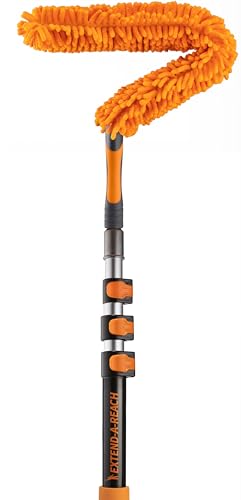
- Long-reach microfiber cleaning brush for fan blades
- Electric air duster blower for cleaning standing fans
- Vacuum cleaner with brush attachment for fan blades


Before You Start
Prepare a clean work area and gather tools before beginning. Ensure the fan is unplugged and the power switch is off to avoid shocks. If the grill is stubborn or the fan is wobbly, do not force components; check the user manual for safety guidance. Expect a short time commitment: most routines take 15–30 minutes depending on dust buildup. Important cautions include avoiding moisture on electrical components and not using aggressive cleaners that could corrode metal finishes.
Step-By-Step: How To Clean A Standing Fan Without Opening It
- Unplug the fan completely and move it to a dry, open area.
- Wipe the exterior housing and grill with a dry microfiber cloth to remove loose dust.
- Use a long-reach microfiber cleaning brush for fan blades to gently sweep dust from the blade edges without removing the grill.
- Employ an electric air duster blower for cleaning standing fans to loosen stubborn dust from between blades and grills. Use short bursts and hold the nozzle a short distance away.
- Carefully direct loosened dust into the surrounding area or onto a protective sheet or vacuum attachment for containment.
- Run the vacuum cleaner with a brush attachment along the grill and around the base to pick up fine dust without bending or pulling on delicate parts.
- Wipe the grill and any accessible metal surfaces with a damp microfiber cloth if allowed by the manufacturer, then dry with a clean cloth.
- Check the blade edge near the center for any buildup; repeat brushing if needed, ensuring the fan is powered off during all handling.
- Reposition the fan, plug in, and test at low speed to confirm smooth operation and absence of rattling or unusual noise.
- Recheck for residual dust around vents and the base; repeat brushing or vacuuming as needed.
- Document any maintenance notes for future reference, including the last cleaning date and tools used.
- Store tools after use and return the fan to its usual location when cooling is required again.
_x000D_
Troubleshooting
| Symptom | Likely Cause | Fix | Prevention |
|---|---|---|---|
| Fan rattles during operation | Lint lodged in the grill or around the motor housing | Clean outer areas and front grill, reseat the grill if needed | Clean regularly to prevent buildup |
| Reduced airflow | Dust on blades or grill | Clean using long-reach brush and vacuum | Schedule quarterly cleanings |
| Unusual odor after cleaning | Moisture on electrical components | Dry thoroughly, avoid wet cleaning near motor | Use minimal moisture and air dry completely |
| Fan stops intermittently | Loose components or power issue | Inspect cord and plug, ensure stability, test at different speeds | Inspect wiring if problem recurs |
Common Mistakes
- Using water or liquid cleaners directly on the grill or motor area
- Forcing the grill off to access blades when the design does not permit it
- Neglecting to unplug the fan before cleaning
- Rushing the cleaning process, leaving dust behind
To prevent issues, follow manufacturer guidance on cleaning and use tools designed for hard to reach areas such as the long-reach brush and air duster.
Tips For Best Results
- Schedule regular cleanings to maintain airflow efficiency and reduce strain on the motor.
- Use the vacuum with a brush attachment to capture dust along the base and blades without disassembly.
- Alternate cleaning tools to reach stubborn dust between the grille slats and around the motor housing.
- Store cleaning tools near the fan so future maintenance is quick and consistent.
Call A Professional
Contact a pro if the fan exhibits persistent noises, uneven rotation, or motor warmth after cleaning. Seek expert assistance if disassembly is required to access internal components, or if there is visible damage to the power cord or switch. Do not attempt repairs beyond basic cleaning on your own.
FAQ
Can I use a wet cloth to clean the fan blade edges?
Use a damp microfiber cloth only on exterior surfaces and avoid moisture near electrical parts.
Is it safe to use an electric air duster on a standing fan?
Yes, when used in short bursts and held away from sensitive components to prevent moisture and static buildup.
How often should a standing fan be cleaned?
Clean every 1–3 months depending on dust exposure and usage. More frequent cleaning is advised in dusty environments.
What if my fan still runs poorly after cleaning?
Inspect for loose parts, test at different speeds, and consider professional service if issues persist beyond cleaning.
Buying Guide
When choosing a standing fan and planning maintenance, consider size, noise level, energy efficiency, controls, and placement. Larger fans move more air but may require more careful cleaning around blades. Noise levels matter for bedrooms and offices; look for models with minimal wobble and balanced blades. Energy efficiency can reduce running cost over time, especially in homes with prolonged cooling. Controls such as remote operation or timers enhance usability without increasing maintenance needs. Place the fan on a stable surface away from walls and clutter to maximize airflow and simplify cleaning. For future cleaning ease, select fans with grills that are easy to wipe and components that are not tightly sealed.
Leave a Reply