How to Clean a Shark Stratos Cordless Vacuum
Cleaning a Shark Stratos cordless vacuum helps maintain suction, extend battery life, and keep your home free of dust and debris. This guide walks through a practical, safe process to refresh components and restore peak performance.
Quick Answer
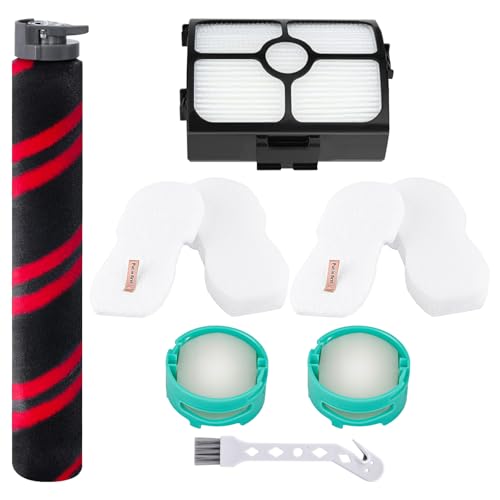
Turn off and unplug the vacuum, remove the dust cup, and check the filter and brush roll. Clean, rinse, and dry as needed, then replace worn parts with the provided replacement filter and brush roll replacement parts. Reassemble, recharge, and run briefly to confirm operation.
What You’ll Need
- Shark Stratos cordless vacuum replacement filter
- Shark Stratos cordless vacuum brush roll replacement
- Shark Stratos cordless vacuum charging dock and battery


Before You Start
Clear a clean workspace and have a trash bag handy. Disconnect the battery and ensure the device is powered off before any disassembly. Avoid using hot water on parts not labeled as washable, and allow all components to dry completely before reassembly. Time estimate: 15–40 minutes, depending on cleaning thoroughness and part replacements.
Step-By-Step: How To Clean A Shark Stratos Cordless Vacuum
- Power down the unit and remove the dust cup to access debris inside.
- Check the brush roll for hair and fibers; release any tangles and cut away trapped strands with scissors if needed.
- Remove the filter from its housing and gently tap to release loose dust over a trash bin.
- Rinse washable filters under cool water until the runoff is clear; avoid using hot water or cleaning detergents unless specified.
- Air-dry the filter completely in a well-ventilated area for at least 24 hours before reinstalling.
- Inspect the dust cup seal and replace the brush roll replacement if rotation feels stiff or debris continues to collect.
- Reassemble the vacuum, ensuring the dust cup snaps securely into place and the brush roll is correctly seated.
- Reconnect the battery and place the unit on its charging dock; charge fully before the next use and perform a brief test run.
Troubleshooting
| Symptom | Likely Cause | Fix | Prevention |
|---|---|---|---|
| Loss of suction | Clogged filter or dust cup | Clean or replace filter; empty dust cup | Regular maintenance after each use |
| Brush roll won’t spin | Hair/tangles in brush housing | Remove debris; inspect bearing | Periodic brush cleanings |
| Vacuum won’t turn on | Battery depleted or faulty connection | Charge on dock; reseat battery | Keep battery contacts clean |
| Unusual noise | Loose parts or worn brush | Check mounting; replace brush roll if needed | Inspect during cleaning to catch wear |
| Filters quickly dirty again | Overfilled dust cup or improper seal | Clean seal; ensure proper dust cup fit | Empty frequently; replace worn seals |
Common Mistakes
- Using hot water on non-washable parts
- Not letting filters dry fully before reusing
- Forgetting to reseat the brush roll after maintenance
- Skipping battery maintenance or charging irregularities
Avoid these pitfalls to keep the Shark Stratos cordless performing optimally over time.
Tips For Best Results
- Establish a routine: quick weekly checks of the filter and brush roll prevent buildup.
- Store the vacuum on its charging dock to maintain battery health and readiness.
- Consider replacing worn parts proactively with the provided brush roll replacement and replacement filter to maintain efficiency.
- Label washable parts and follow the manufacturer’s drying times to prevent mold growth.
Call A Professional
Consult a professional if the vacuum shows persistent electrical issues, a grinding noise that doesn’t resolve after cleaning, or if replacement parts are difficult to install securely. Seek help immediately if there are signs of battery swelling or overheating.
FAQ
Can I wash Shark Stratos filters in a dishwasher?
Do not use a dishwasher; rinse under cool water and air dry fully before reuse.
How often should I replace the brush roll?
Replace when visible wear or bald spots reduce brush efficiency, or per manufacturer guidance.
Is it necessary to replace the battery when cleaning?
Battery replacement is only needed if performance drops significantly or the unit refuses to hold a charge.
What should I do if the vacuum stops charging?
Check the charging dock, battery connection, and ensure the unit sits correctly on the dock; if unresolved, replace the battery or consult support.
Buying Guide
When selecting replacement parts or accessories for the Shark Stratos cordless, consider size, compatibility, and ease of installation. Look for official components to ensure optimal fit and performance, especially for a cordless model with a sealed battery and filter system.
Key buying factors include:
- <bSize and fit — ensure parts are listed as compatible with Shark Stratos cordless vacuums.
- <bNoise level — consider whether quieter operation is important for home use.
- Energy efficiency — choose parts that preserve suction and battery life, such as high-quality filters and efficient brushes.
- Controls and ease of maintenance — quick-release filters and tool-free brush roll access speed upkeep.
- <bPlacement and storage — a charging dock or wall-mounted solution should fit your closet or utility space.
Considering these aspects helps balance performance with convenience. If you’re deciding between multiple options, think about how often you’ll perform maintenance and how quickly you want to restore full functionality after cleaning.
Leave a Reply