How to Remove Facial Hair Safely and Effectively
Facial hair is a common concern for many people. This guide explains practical methods, safety considerations, and steps to achieve smoother skin with tools that are commonly used in American households. Readers will find a balanced overview of options suitable for different skin types and budgets, along with tips to minimize irritation and boost results.
Quick Answer
For fast, temporary results, consider a dermaplaning razor or an electric facial hair trimmer designed for women. For longer-lasting results, an electric epilator focused on the face or a professional waxing option may be explored. Always follow product instructions and patch-test first to reduce irritation.
What You’ll Need
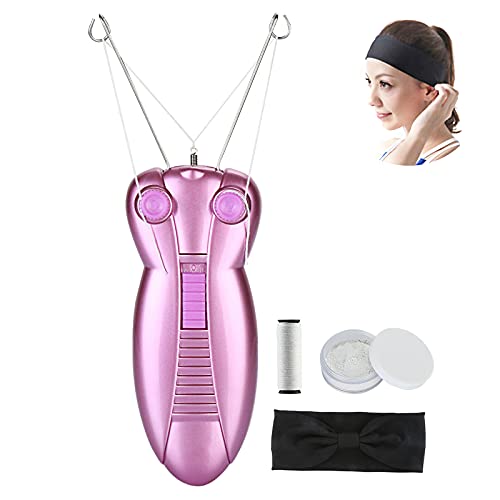
- Facial hair removal tool electric epilator for face
- Dermaplaning razor for face
- Electric facial hair trimmer for women


Before You Start
Before removing facial hair, prepare the skin to reduce irritation. Cleanse with a gentle cleanser and warm water to soften hairs. If you have sensitive or acne-prone skin, consider performing a patch test on a small area 24 hours before full use. Avoid using any sharp tools on broken or inflamed skin, and never share devices to prevent infections. Plan for a time window to finish the routine without rushing, and apply a soothing moisturizer after treatment.
Step-By-Step: How To Remove Facial Hair Safely
- Gently cleanse the face and pat dry. This removes oils that can interfere with tool performance.
- Choose the method based on your goal: temporary smoothness versus longer-lasting results.
- If using a dermaplaning razor for the face, hold the skin taut and glide the blade at a shallow angle in short strokes, then rinse and dry the area.
- If using an electric facial hair trimmer for women, switch to a suitable guard or trimming length and move against the direction of hair growth for even results.
- If using an electric facial hair epilator for the face, align the device with the hair growth pattern and apply steady pressure as it removes hair from the root. Be prepared for a brief sting on sensitive areas.
- After removing hair, rinse with cool water to close pores and apply a soothing moisturizer or aloe gel to calm the skin.
- Test a small area after 24 hours for any irritation. If irritation occurs, reduce frequency or switch to a gentler technique.
- Store devices in a clean, dry place and replace consumable parts as recommended by the manufacturer.
- Consider layering sun protection during the day, especially after exfoliating or shaving, to prevent sensitivity and redness.
- Document your routine to identify which method delivers the best balance of comfort and results over time.
- Adjust frequency based on hair regrowth pace; some methods require longer intervals between sessions for optimal outcomes.
- Reassess your skin’s response after a few weeks and consult a professional if persistent irritation or unusual reactions occur.
Troubleshooting
| Symptom | Likely Cause | Fix | Prevention |
|---|---|---|---|
| Irritation or redness | Over-exfoliation or harsh tool | Pause use for 1–2 days; switch to gentler technique | Patch-test; use soothing products |
| Inconsistent hair removal | Uneven pressure or wrong angle | Slow, controlled motions; ensure skin taut | Practice with less pressure |
| Razor nicks | Blunt blade or dry skin | Use a sharp blade; apply light moisturizer before use | Prep skin with warm water and oil or cream |
| Stinging sensation | Product interaction with sensitive skin | Switch to fragrance-free products | Test before full use |
Common Mistakes
- Using tools on damp or broken skin, which increases irritation and risk of infection
- Applying heavy pressure in hopes of faster results
- Skipping patch tests before trying a new device or method
- Exfoliating immediately after hair removal, which can aggravate the skin
- Neglecting sun protection after treatment, leading to redness and increased sensitivity
Tips For Best Results
- Choose a method aligned with your goals: quick touch-ups vs longer-lasting hair removal.
- Always follow the device manufacturer’s directions for use and maintenance.
- Keep the skin taut during certain techniques to prevent nicks or uneven results.
- Moisturize regularly and consider a calming serum after treatments to minimize irritation.
- Stagger sessions to avoid over-processing the same area within short intervals.
- Keep records of which method works best for your skin and hair texture, and adjust as needed.
Call A Professional
Seek a licensed professional if there is persistent redness, swelling, scarring, or if you are considering more permanent solutions. Stop using home methods if you notice unusual changes in texture or color. Certain medical conditions or medications can affect skin sensitivity; a dermatologist can offer personalized guidance.
FAQ
Is facial hair removal safe for sensitive skin?
Yes, with precautions such as patch tests, using gentle products, and following the device guidelines.
How often can I remove facial hair?
Frequency depends on the method and hair growth rate; start with longer intervals and adjust as needed.
Can I use multiple methods on the same area?
It is usually best to stick to one method per session to minimize irritation, unless advised otherwise by a professional.
Will facial hair regrow thicker after removal?
Hair regrowth typically maintains the same texture and thickness; regrowth may feel coarser or finer depending on the method and individual hair cycle.
Buying Guide
When selecting a device for facial hair management, consider key factors such as size and design, noise level, energy efficiency, controls, and placement. A compact, moveable tool is helpful for targeted areas like the upper lip or chin. Look for quiet operation and adjustable settings to suit sensitive skin. Energy-efficient devices reduce battery usage and extend usage between charges. Choose a design that fits your routine and storage space. For placement, consider a device with a waterproof or water-resistant rating if you prefer using it in the shower or around a sink. Compare the included attachments and ease of cleaning, as these affect daily usability and long-term cleanliness. Finally, review warranty options and customer support to ensure reliable assistance if replacements or repairs are needed.
Leave a Reply