How to Clean a Culligan Water Dispenser
Regular cleaning of a Culligan water dispenser helps maintain optimal taste, prevents mineral buildup, and ensures the unit operates efficiently. This guide provides a practical, step-by-step approach using common cleaning tools and specialty items designed for office and home water coolers. Following these steps can extend the life of the dispenser and keep the water fresh for everyday use.
Quick Answer
Disassemble, sanitize, and rinse the exterior and interior components every 1–3 months. Use a descaler when mineral buildup is visible, and a dedicated cleaning kit for thorough sanitization. Always rinse thoroughly to avoid residual taste.
What You’ll Need
- Culligan water dispenser cleaning kit
- Descaler tablets for water cooler
- Water cooler brush cleaning kit
- Clean, cold water container for rinsing
- Non-abrasive sponge or cloth
- Clean towels or rags
- Protective gloves (optional)


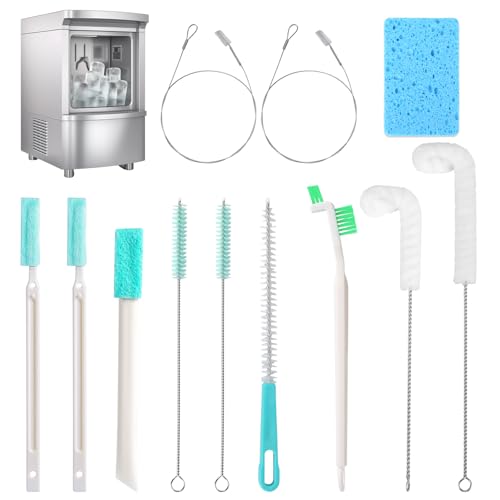
Before You Start
Prepare a clean workspace and unplug the dispenser from power before beginning. Drain remaining water from the reservoir and remove the water bottle if applicable. Don’t skip the sanitizing step—it eliminates lingering flavors and bacteria. If your unit has a hot-water function, ensure it is cooled or turned off before cleaning. Time estimates: typically 30–60 minutes for a full clean.
Step-By-Step: Clean And Sanitize Your Culligan Water Dispenser
- Turn off and unplug the dispenser; remove the bottle and drain the reservoir completely.
- Mix a sanitizing solution according to the kit or manufacturer instructions, using clean water in a small bucket.
- Using the water cooler brush cleaning kit, scrub the visible surfaces, reservoirs, and drip tray to remove grime.
- Rinse the interior by flushing clean water through the system, ensuring all soap and residue exit the dispense nozzle.
- Apply descaler tablets for water cooler where mineral buildup is detected; allow the solution to sit as directed to break down scale.
- Flush the system again with fresh water to remove descaling agents; repeat as needed until the water runs clear.
- Sanitize again using a recommended sanitizer, then perform a final thorough rinse to remove any sanitizing odors or residues.
- Reassemble the unit, reattach the bottle, and run a few cycles to ensure the spouts deliver clean water before use.
- Document the cleaning date so you can schedule the next maintenance interval.
Troubleshooting
| Symptom | Likely Cause | Fix | Prevention |
|---|---|---|---|
| Water has odd taste after cleaning | Residual sanitizing agent | Run multiple rinses with clean water | Rinse thoroughly; ventilate during cleaning |
| Dispenser leaks | Loose connections or seals | Check and tighten connections; replace gaskets if needed | Inspect seals during routine maintenance |
| Spout drips or spurts | Air trapped in lines | Run several cycles without bottle to purge air | Regularly purge lines after cleaning |
| Slow dispense or Reduced flow | Clogged filters or mineral buildup | Clean, descale, and replace filters if applicable | Schedule periodic descales |
| Visible scale on reservoir | Hard water mineral buildup | Apply descaler tablets as directed and rinse | Use appropriate descalers according to water hardness |
Common Mistakes
- Not unplugging the unit before cleaning, risking electrical shock
- Skipping thorough rinsing, which leaves a chemical taste
- Using abrasive cleaners that can damage plastics
- Ignoring the drip tray and exterior—bacteria can accumulate
- Using the descaler without following dosage or dwell-time guidelines
Tips For Best Results
- Establish a routine: light cleaning monthly, deep clean quarterly, and scale removal as needed based on water hardness.
- Use the Culligan water dispenser cleaning kit regularly to simplify sanitizing and keep components accessible.
- Always rinse until the water runs clear and scent-free before returning a bottle to the dispenser.
- Label the maintenance dates on the unit or a wall calendar to stay consistent.
Call A Professional
If you notice persistent leaks, unusual noises, persistent odors after cleaning, or if the unit fails to produce cold water, contact a certified technician. Seek immediate help if there is a strong sulfur or metal smell, which may indicate deeper water quality or component issues.
FAQ
How often should I clean my Culligan water dispenser?
Most users benefit from a light clean monthly and a deep sanitize every 3–6 months, plus descaling as needed based on mineral content.
Can I use regular household cleaners on the dispenser?
Avoid harsh or abrasive cleaners; use manufacturer-approved sanitizers and descalers to prevent damage.
Is it safe to run hot water through the cleaning cycle?
Only if your unit is designed for hot-water dispensing; otherwise, use cold-water sanitizing methods as directed.
What should I do if the water has a metallic taste after cleaning?
Rinse thoroughly and check for corroded components or contaminated filters; replace as needed and ensure proper sanitization.
How can I prevent mineral buildup?
Regular descaling based on water hardness and routine cleaning reduce buildup and extend component life.
Buying Guide
When selecting or maintaining a Culligan water dispenser, consider size, noise level, and placement. Think about how much space is available for the unit and whether a freestanding or countertop model fits your kitchen or office. Noise level matters in quiet spaces, so inspect decibel ratings if available. Energy efficiency is important for ongoing running costs—look for units with efficient compressors and insulated reservoirs. Controls should be intuitive, with clear temperature and dispensing options. Finally, determine placement: near a water source, away from direct sunlight, and on a stable surface to reduce vibration and wear. For best results, pair the dispenser with the right cleaning and descaling accessories to streamline routine maintenance, and keep a small cleaning kit within reach for quick touch-ups between deeper cleans.
Leave a Reply