How to Clean AirPods Charging Port
Keeping the AirPods charging port clean helps ensure reliable charging and optimal performance. Over time, lint, dust, and earwax can accumulate in the Lightning connector, causing intermittent charging or poor contact. This guide walks through safe, practical steps to clean the AirPods charging port using tools designed for precision care.
The process is straightforward but requires care to avoid damaging the delicate connectors. With the right tools and a gentle touch, most buildup can be removed without professional help. This article outlines a safe method, quick tips, and common mistakes to avoid for American users seeking a DIY solution.
Quick Answer
Power off your AirPods and use a soft-bristled brush or a dedicated cleaning tool to remove debris from the Lightning port. Gently insert the tool at the port entrance, rotate slightly, and avoid metal probes or liquid cleaners. If stubborn buildup remains, stop and consult a professional to prevent damage.
What You’ll Need
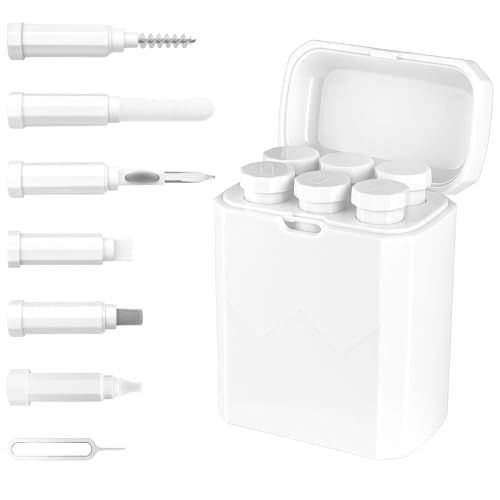
- AirPods charging case cleaning tool kit with soft brush
- AirPods Pro charging case Lightning port cleaning brush
- AirPods charging port dust remover tool for Lightning connector


Before You Start
Power down the AirPods and ensure they are completely cool before cleaning. Work in a well-lit area to spot tiny particles. Use only dry tools on the Lightning port to prevent moisture damage. Avoid shoving objects too deep into the port, which can bend connectors or push debris further in. Plan for a 5–10 minute cleaning session and pause if you notice any looseness or corrosion.
Cautions: Never spray liquids directly into the port. Do not use metal tools that can scratch or break the connector. If the port shows signs of damage or overheating after cleaning, stop and seek professional help.
Step-By-Step: How To Clean AirPods Charging Port
- Power off the AirPods and place the case on a dry, stable surface.
- Inspect the Lightning port using good lighting to locate visible debris.
- Hold the case with the port facing up and use a soft brush from the cleaning kit to gently sweep loose particles away from the entrance.
- Gently insert the dust remover tool or brush tip at the port opening. Apply light, controlled pressure while twisting slightly to lift lodged lint.
- With another angle, sweep along the edges of the port to dislodge debris without touching the internal pins.
- Wipe the exterior with a dry microfiber cloth to remove any residue you loosen during the process.
- Power the AirPods back on and test charging to confirm better contact. If charging remains erratic, repeat once more carefully.
- If resistance or corrosion is detected, stop cleaning and consult a technician.
Troubleshooting
| Symptom | Likely Cause | Fix | Prevention |
|---|---|---|---|
| AirPods won’t charge | Debris blocking the port | Gently clean as described above, re-test | Clean periodically, avoid carrying in dusty pockets |
| Charging intermittently | Partial port blockage or loose connector | Re-clean with controlled, light strokes | Inspect monthly |
| Visible corrosion | Moisture exposure | Stop cleaning with liquids; seek professional help | Keep dry; store away from humidity |
| Unusual heat after charging | Electrical contact issue | Discontinue use and have inspected | Use original accessories |
Common Mistakes
- Using metal tools or metal threads in the port
- Applying liquids near the Lightning connector
- Pushing debris deeper into the port
- Cleaning too aggressively, which can bend pins
Tips For Best Results
- Clean in a well-lit area with a magnified view if possible to avoid missing particles.
- Use a dedicated cleaning kit designed for AirPods to ensure bristle softness and proper tool shape.
- Clean the exterior case lid and charging contacts to improve overall charging reliability.
- Regular light maintenance is better than deep cleaning after months of buildup.
Call A Professional
Seek professional help if you notice physical damage to the Lightning port, persistent charging problems after cleaning, or signs of corrosion. Do not attempt to disassemble the charging case yourself, as this can void warranties or cause further damage.
FAQ
Can I use water to clean AirPods charging port?
No. Water can damage electrical contacts. Use dry tools and a soft brush only.
What if debris keeps returning after cleaning?
Lint buildup is common in pockets and bags. Regular, gentle cleaning with the proper tools is recommended.
Is it safe to use a cotton swab?
Avoid cotton swabs as they can shed fibers and push debris deeper or scratch the port.
Will cleaning void my warranty?
Cleaning with recommended tools typically does not void the warranty, but avoid opening the device or using metal implements.
Buying Guide
When choosing cleaning tools for AirPods charging ports, consider versatility, material softness, and compatibility with Lightning connectors. Key factors include:
- <bSize and reach: Tools should access the port without causing pin bending.
- <bSoft brush vs. firm bristles: Softer brushes reduce risk of scratches and are gentler on connectors.
- <bMaterial quality: High-quality plastics and fibers resist fraying and shed fewer particles.
- <bPort compatibility: Kits labeled for AirPods or Lightning ports ensure appropriate shapes.
- <bPort protection: Some kits include protective caps or dust shields for storage between uses.
- <bEase of use: Ergonomic handles and simple instructions help consistency in practice.
When comparing options, look for sets that include a soft brush, a dedicated dust remover tool, and a clean storage solution. Do not assume all cleaning tools are interchangeable; choosing purpose-built tools helps protect the delicate charging contact area and maintain device longevity.
Leave a Reply