How to Clean iPad Speakers Safely and Effectively
Over time, iPad speakers can collect dust, lint, and debris that muffle sound and reduce performance. A careful cleaning routine helps restore clarity without risking damage to the delicate speaker grills or internal components. This guide provides practical steps, tools, and safety tips to keep iPad audio crisp and clear.
Quick Answer
Use a soft brush to loosen surface dust, follow with compressed air for stubborn particles, and wipe with a microfiber cloth to finish. Avoid excessive pressure or moisture near speakers, ports, or openings.
What You’ll Need
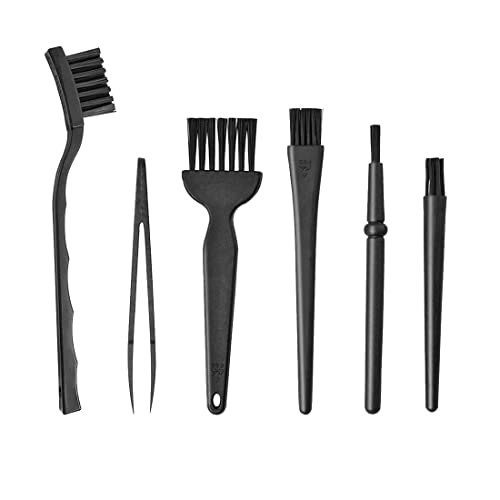
- Soft bristle electronics cleaning brush for speaker grills
- Compressed air duster for electronics cleaning 12 oz
- Microfiber cloth for electronics cleaning 12×12 inches


Before You Start
Prepare a clean, dry workspace and ensure the iPad is powered off and not connected to any accessories. Work slowly and avoid probing into the speaker openings. Keep liquids away and do not spray cleaning solutions directly onto the device. Inspect the area around the speaker grills for visible signs of damage or loose parts. Time estimate: 5–10 minutes for a quick clean; 15–20 minutes for a thorough session.
Step-By-Step: How To Clean iPad Speakers
- Power off the iPad and unplug any accessories to prevent accidental operation during cleaning.
- Hold the device with the speaker grills facing up at a slight angle to avoid pushing debris deeper into openings.
- Gently brush the grill with the soft bristle electronics cleaning brush in a light, sweeping motion to loosen accumulated dust.
- Use short bursts of compressed air from a distance of several inches to dislodge particles. Keep the can upright and avoid long, continuous bursts directly at the grille.
- With the grills still dry, wipe the surface around the speakers using a microfiber cloth to remove loosened dust and any smear from the edges.
- Inspect the speaker openings for remaining debris. If needed, repeat the brushing and light air bursts, always avoiding moisture.
- Test the speakers by powering on the iPad and playing a short audio sample at a low volume to confirm clarity without distortion.
- If dust persists, consider a second gentle pass with the brush and air, ensuring no moisture contacts the device.
- Store the tools within easy reach for routine maintenance, keeping the iPad in a clean, dust-free environment.
- For stubborn particles embedded in the grill, do not insert objects into gaps. Instead, repeat the brushing and air technique or consult professional service if integrity is in doubt.
- Document any findings and schedule a regular cleaning cadence based on usage and environment (home, office, or outdoors).
Troubleshooting
| Symptom | Likely Cause | Fix | Prevention |
|---|---|---|---|
| Reduced speaker clarity after cleaning | Debris pushed deeper | Repeat gentle brushing and air bursts | Clean with soft motions, avoid aggressive probing |
| Audible rasping or crackling | Moisture exposure | Power off, dry completely before use | Keep liquids away, air-dry if any contact occurs |
| No sound from one or both speakers | Loose connector or software issue | Restart device; check accessibility settings | If persists, seek professional help |
| Dust reaccumulation quickly | Dirty environment | Increase maintenance frequency | Use protective storage and keep area cleaner |
Common Mistakes
- Using liquids or sprays directly on the iPad near the speakers
- Applying strong pressure with tools into the grill
- Relying solely on compressed air without brushing to loosen dust
- Cleaning while the device is powered or connected to power
Sticking to light, dry methods minimizes risk while maintaining effective results.
Tips For Best Results
- Schedule routine cleanings based on environment; dusty offices or outdoors require more frequent maintenance.
- Store the iPad away from direct airflow that carries dust, such as near vents or fans.
- Keep the cleaning brush dedicated to electronics to avoid cross-contamination with other tools.
- Gently test audio after each cleaning pass to verify improvement and prevent overhandling.
Call A Professional
Consult a professional if you notice physical damage to the grill, loose internal components, or persistent audio issues after cleaning. Stop cleaning if you observe cracking, unusual heat, or water intrusion. Seek expert service when the device is under warranty or if internal access is required beyond surface cleaning.
FAQ
Can I use a regular brush to clean iPad speakers?
A dedicated soft-bristle electronics cleaning brush is recommended to avoid scratching the grill.
Is compressed air safe for iPad speakers?
Yes, used correctly from a distance and in short bursts, it helps dislodge debris without moisture.
Should I use wet wipes near the speakers?
Avoid moisture near speaker grills; use a dry microfiber cloth if needed for stubborn smudges away from the openings.
How often should iPads be cleaned in a typical home?
Every 1–3 months, or sooner in dusty environments, with adjustments based on usage and conditions.
What if cleaning doesn’t improve sound quality?
Consider professional inspection to check for hardware issues beyond surface debris.
Does cleaning affect water resistance?
Most iPads are not fully water-resistant around speakers; avoid moisture and consult support if exposure occurs.
Can I clean the speakers while the iPad is charging?
It is safer to clean after powering down and disconnecting from power to prevent shorts.
Buying Guide
Choosing the right cleaning setup for iPad speakers involves considering size, noise, energy use, controls, and placement. A small, quiet, purpose-made toolkit is ideal for regular maintenance. Look for a soft bristle electronics cleaning brush that reaches the grill without penetrating openings, a compressed air duster with a controllable spray, and a microfiber cloth that is lint-free and washables. Consider how you store tools near your workspace and the ease of reusing materials. When selecting products, prioritize gentle, dry methods and avoid liquids near speaker openings. A compact, corrosion-resistant solution allows quick, effective maintenance without disrupting daily use. For most American households, a lightweight kit with three items provides a practical balance of effectiveness, safety, and value.
Leave a Reply