How to Clean a Disk Safely
Disc cleaning helps restore playback and protect the longevity of CDs and DVDs. This guide outlines practical, safe methods using common cleaning products designed for optical discs, and explains when to seek professional help. Readers will learn a straightforward routine that minimizes scratches and damage while improving reading reliability.
Quick Answer
Use a gentle cleaning method with a CD/DVD lens cleaner disc or a cleaning kit that includes solution and microfiber cloth. Always wipe from the disc’s center out to the edge and avoid circular scrubbing. If playback issues persist after cleaning, consider whether the disc is scratched or if the drive lens requires professional service.
What You’ll Need
- CD/DVD lens cleaner disc kit
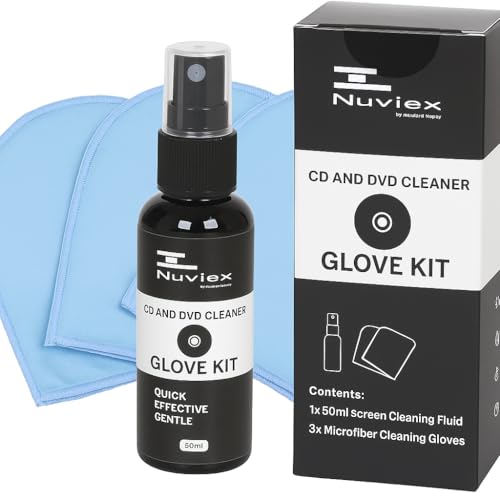
- CD/DVD cleaning kit with solution and microfiber cloth
- CD/DVD laser lens cleaning disc

Before You Start
Prepare a clean, dust-free workspace. Wash and dry hands to prevent transferring oils to the disc surface. Inspect the disc for deep scratches or warping; such damage may be unrecoverable. Do not use abrasive cleaners or solvents not designed for optical discs. If cleaning a drive with a malfunctioning laser or motor, do not attempt DIY repairs and contact a service technician.
Step-By-Step: How To Clean A Disk
- Identify the type of disc and confirm cleaning tools are compatible with CDs or DVDs. Use only items specified by the product instructions.
- Place the disc on a clean, flat surface or hold it by the edges to avoid touching the data surface.
- If using a lens cleaner disc, insert it into the drive and run a standard cleaning cycle according to the kit’s directions. Let the drive finish the cycle without interrupting.
- For cleaning kits with solution and microfiber cloth, apply a small amount of solution to the cloth only (never directly onto the disc). Wipe from the center of the disc outward toward the edge in a straight motion.
- Use a dry microfiber section or a separate dry cloth to remove any remaining moisture from the disc surface.
- Inspect the disc under good lighting. If smudges persist, repeat the wipe using a fresh cloth, still moving from center to edge; avoid circular scrubbing.
- Reinsert the disc to test playback. If issues continue, try cleaning with a new cleaning disc or consult the drive manufacturer’s recommendations.
- Store discs upright in their cases after cleaning to minimize exposure to dust and oils.
- For stubborn smudges or fingerprints, consider using a dedicated cleaning solution designed for optical media and repeat the process carefully.
- If cleaning a drive’s lens, avoid aggressive cleaning cycles. Only use products specifically labeled for lens cleaning and follow the manufacturer’s directions.
- Document and label discs that repeatedly fail to play after cleaning; repeated failures may indicate deeper disc damage or drive alignment issues.
- Dispose of used wipes and cleaning materials responsibly. Do not reuse contaminated cloths across multiple discs.
Troubleshooting
| Symptom | Likely Cause | Fix | Prevention |
|---|---|---|---|
| Disc still stalls or skips after cleaning | Surface scratches or deep data layer damage | Test with another disc; if persists, consider replacement or professional resurfacing | Handle discs by edges; store properly |
| Noise or clicking during playback | Dirty or warped disc | Clean again using lint-free cloth; inspect for warping | Avoid bending discs; keep them clean and dry |
| Book-type binding or data not recognized | Dust on drive lens | Use a lens cleaning disc per instructions | Regular, gentle cleaning and avoiding touching internal components |
| Water spots or streaks appear after cleaning | Excess liquid or improper drying | Wipe with a dry cloth from center to edge and air-dry briefly | Use minimal solution and ensure complete drying |
Common Mistakes
- Using household cleaners or acetone on discs
- Wiping in circles or scrubbing aggressively
- Applying too much cleaning solution directly onto the disc
- Cleaning with dirty or rough fabrics that scratch the surface
- Ignoring signs of deep scratches or warping
Correct technique and appropriate products protect data integrity and extend disc life.
Tips For Best Results
- Always wipe from the center outward; this reduces data-streak risk.
- Use a fresh microfiber cloth for each cleaning pass to avoid recontamination.
- Test clean discs in different players to confirm consistent playback.
- Store discs in their cases away from heat, humidity, and direct sunlight.
- Consider a routine that includes dust-free storage and occasional lens cleaning for drives with heavy use.
Call A Professional
Seek professional help if the drive exhibits repeated read errors across multiple discs, if the lens cleaning cycles fail to improve performance, or if there are signs of mechanical failure in the drive itself. Do not attempt internal repairs on a malfunctioning optical drive, especially if the device is under warranty.
FAQ
Will a lens cleaning disc damage my drive?
When used as directed, a lens cleaning disc is designed to safely remove dust from the lens without harming components.
Can I clean a dirty CD/DVD with water?
A small amount of water can help if used with care, but it is generally safer to use approved cleaning solutions or dry methods to avoid liquid seeping into the drive.
How often should I clean discs?
Clean discs only when needed, and follow a routine that matches usage. Frequent cleaning is not required unless smudges or playback issues occur.
What if my disc has deep scratches?
Deep scratches may be unrecoverable; attempting aggressive repair can worsen data loss. Consider replacement or professional disc resurfacing if available.
Are all cleaning kits compatible with both CDs and DVDs?
Most kits are designed for both formats, but always check the product instructions to ensure cross-format compatibility.
Buying Guide
Choosing the right cleaning method depends on disc type, wear level, and user preference. Consider several factors to optimize results and protect data integrity.
- Size and format compatibility: Ensure the cleaning kit or disc is designed for CDs, DVDs, or both. A universal kit can simplify maintenance for mixed media collections.
- Noise level and motor wear: Some drives are sensitive to cleaning cycles; pick a kit with gentle, low-noise operation if the drive is older or is frequently used.
- Energy efficiency: Lens cleaning discs typically consume minimal power. If your setup relies on power-saving options, verify that the cleaning method does not negate this benefit.
- Controls and ease of use: Look for clear instructions, minimal steps, and compatibility with your drive’s loading mechanism.
- Placement and storage: Keep cleaning supplies away from heat sources; store discs upright in cases to prevent warping.
When evaluating options, compare cleaning discs, kits with solutions, and combination sets for value and coverage. A practical approach is to select a kit that includes a lens-safe cleaning disc and a microfiber cloth, ensuring you have a ready-to-use solution for routine maintenance.
Leave a Reply