How to Clean Metal Files
Metal files are precision tools that can lose their effectiveness when clogged with metal shavings, dust, and debris. Regular cleaning restores cutting action and extends the life of the file. This guide walks through practical, safe steps to clean metal files using common tools and techniques suitable for hobbyists and professionals in American workshops.
Understanding how and why to clean metal files helps maintain a smooth filing action, reduces heat buildup, and prevents cross-contamination between materials. The methods below are designed to be gentle on the file’s teeth while removing stubborn buildup efficiently.
Quick Answer
Use a dedicated steel file cleaning brush or a wire brush to remove chips, then wipe with a clean cloth. For fine debris or rust, a file cleaning card or a dedicated file maintenance tool can lift particles between teeth. Dry thoroughly and store files in a dry place to prevent corrosion.
What You’ll Need
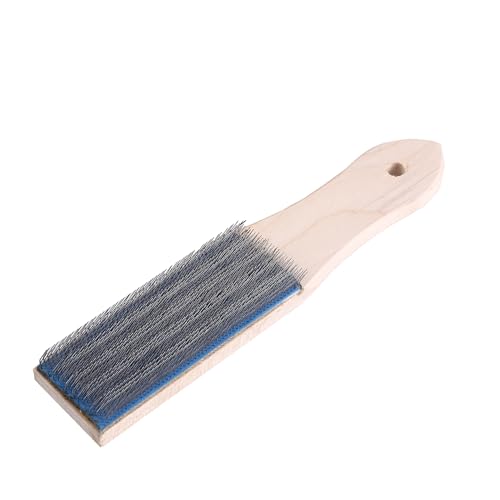
- steel file cleaning brush for metal files
- wire brush for metal files cleaning and maintenance
- file cleaning card for rasps and files


Before You Start
Prepare a work area with good lighting and a stable surface. Wear eye protection to guard against flying chips. If cleaning rust or stubborn buildup, work slowly to avoid bending or dulling the teeth. Ensure the file is cool before cleaning to prevent burns and prevent moisture contact with heated metal to avoid warping. Plan for a 5–15 minute cleaning session depending on the level of debris.
Step-By-Step: How To Clean Metal Files
- Place the file on a stable surface with the teeth facing up to expose clogged areas.
- Use a steel file cleaning brush for metal files to brush along the teeth from tip to shank, applying light pressure to lift chips.
- For stubborn buildup between teeth, use the file cleaning card for rasps and files to comb through the grooves without prying at the teeth.
- Switch to a wire brush for metal files cleaning and maintenance to dislodge any remaining particles, concentrating near the base of the teeth.
- Wipe the file with a clean, dry cloth to remove loosened debris and dust.
- Inspect the file under good light to check for residual chips or rust; if needed, repeat brushing and carding in small sections.
- If rust is present, lightly rub the affected area with a non-abrasive abrasive pad or steel wool, then re-clean and dry thoroughly.
- Dry the file completely with a soft cloth and store in a dry, ventilated area to reduce corrosion risk.
- For precision files, maintain even wear by cleaning after each use and avoiding aggressive scraping that wears the teeth.
- When cleaning multiple files, organize them by size and type to prevent cross-contamination of materials.
- Re-check the teeth for sharpness after cleaning by testing on scrap material before resuming work.
Troubleshooting
| Symptom | Likely Cause | Fix | Prevention |
|---|---|---|---|
| Gritty feel during use | Clogged teeth with debris | Thorough brush and card cleaning; wipe dry | Clean after use to prevent buildup |
| Rust on teeth | Moisture exposure or poor storage | Lightly sand or rub with non-abrasive pad; dry completely | Store in a dry place; oil lightly if long-term storage |
| Teeth dull or rounded | Over-aggressive cleaning or excessive force | Gentle brushing; switch to cleaning card for stubborn areas | Use proper technique; avoid twisting the file while cleaning |
| Debris reappears quickly | Contaminants from workpieces | Clean workpieces before filing; use dedicated files for each material | Separate files by material and routine maintenance |
Common Mistakes
- Using abrasive pads that damage the file teeth
- Cleaning with excessive force or twisting motions
- Neglecting to dry files after cleaning, leading to rust
- Mixing files used for different materials without proper cleaning
These missteps can shorten file life and reduce cutting efficiency. Gentle, deliberate cleaning preserves the tooth geometry and performance.
Tips For Best Results
- Clean files after each project to maintain peak cutting action.
- Keep a dedicated cleaning kit with the three tools listed above for quick maintenance.
- Store files in a dry, ventilated container or rack to minimize moisture exposure.
- Run a light pass on scrap material after cleaning to confirm teeth are free of debris.
- Label files by size and type to avoid cross-use that can dull teeth.
Call A Professional
Consult a professional if a file shows severe rust that cannot be removed with light brushing, if teeth are bent or chipped, or if professional restoration is needed for specialized files. Also seek help if cleaning supplies cause visible damage or affect precision surfaces.
FAQ
Can I clean metal files with water?
Water can promote rust; use dry brushes and cloths, and ensure complete drying if moisture is introduced.
How do I remove rust without damaging teeth?
Use a light abrasive pad or rust remover designed for metal tools, followed by thorough drying and lubricating oil if appropriate for storage.
What should I do after cleaning a file?
Inspect for sharpness, wipe clean, and store in a dry location to prevent corrosion.
Are there specialized products for file maintenance?
Yes, dedicated file cleaning brushes, cleaning cards, and maintenance brushes are formulated to lift debris without harming the teeth.
Buying Guide
When selecting tools to clean metal files, consider the size of your files, the most common materials you work with, and storage conditions. Look for a kit that includes a steel file cleaning brush for metal files, a wire brush for metal files cleaning and maintenance, and a file cleaning card for rasps and files. Choose durable, corrosion-resistant tools that fit comfortably in hand and survive regular cleaning sessions. For busy workshops, a compact, organized set can streamline routine maintenance and prolong the life of your files.
Key buying factors include:
- Size and compatibility with your file collection
- Quality of the brushes and cleaning card material
- Low-abrasion design to protect tooth geometry
- Rust resistance and long-term durability
- Storage solutions that keep tools dry and accessible
Would you benefit from a combined cleaning kit that covers multiple file types and sizes? A well-chosen set can simplify maintenance and help keep metal files performing at their best.
Leave a Reply