How to Clean Dyson Stick Vacuum
Dyson stick vacuums offer powerful cleaning in a lightweight package, but routine maintenance keeps them performing at peak efficiency. This guide provides a clear, step-by-step approach to cleaning your Dyson stick vacuum, including common tasks like emptying the bin, cleaning the filter, and refreshing the brush bar.
Following these steps helps reduce loss of suction and extends the life of your machine. The instructions apply to most Dyson cordless stick models, including the V-series, with minor variations noted where relevant.
Quick Answer
Quick steps: Empty the bin, check for clogs, clean or replace the filter, wipe the wand and brush bar, and replace any worn parts. For best results, perform a quick monthly clean and a deep clean every 3–6 months depending on use.
What You’ll Need
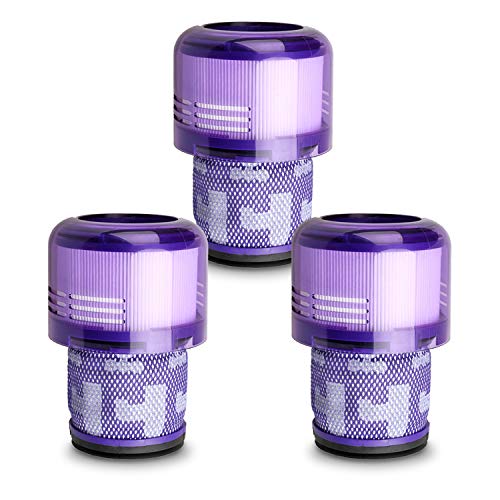
- Dyson V11 filter replacement kit
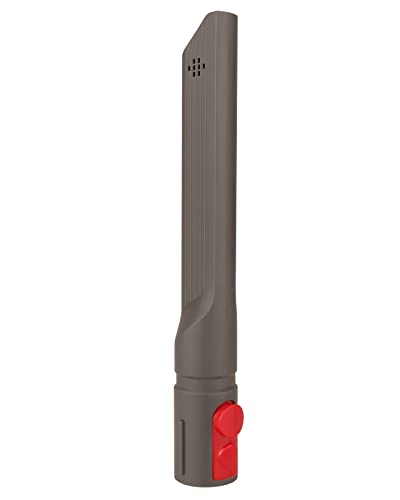
- Dyson cordless stick vacuum crevice tool replacement
- Dyson brush bar cleaning tool

Before You Start
Prepare a clean, well-lit workspace. Gather the included tools and a small container for screws or tiny parts. Turn off and unplug or detach the battery before starting any maintenance. If your model uses a rapid-release wand, ensure you follow the manufacturer’s instructions to avoid damage. Time estimates vary: a quick clean can take 5–10 minutes, while a full deep clean may require 20–40 minutes.
Step-By-Step: How To Clean Dyson Stick Vacuum
- Power down and access the dust bin. Remove the bin and empty it into a trash bin. Wipe the interior with a dry cloth to remove fine dust.
- Check for blockages. Inspect the wand, filter housing, and agitator area for hair or fibers. Use the crevice tool replacement to tease out stubborn debris, especially in tight bends.
- Clean or replace the filter. If your model includes a washable filter, rinse with cold water until clear and let air-dry completely before reinstalling. If you use a filter replacement kit, install a fresh filter per the product instructions.
- Clean the brush bar. Remove the brush bar from the head and use the brush bar cleaning tool to cut away tangled hair. Wipe the bar and housing with a damp cloth; ensure it is completely dry before reassembly.
- Inspect the cleaner head and airways. Check the cleaner head for debris and ensure air paths aren’t obstructed. Use the crevice tool to clear any remaining obstructions inside the nozzle.
- Reassemble and test. Once all parts are clean and dry, reassemble the vacuum. Turn it on briefly to confirm suction and listen for unusual noises that may indicate a misaligned part.
- Establish a maintenance cadence. Schedule a quick monthly check and a deeper annual cleaning to keep performance high.
- Optional care for accessories. Clean the crevice tool and any attachments after heavy use to prevent buildup and maintain suction efficiency.
- Address common wear parts. If the brush bar or seals show signs of wear, consider replacements to restore peak performance.
- Document maintenance. Keep a simple log of when you replaced filters or parts so you stay on a regular schedule.
- Safe storage. Store the vacuum in a clean, dry area away from moisture and direct sunlight to prevent material deterioration.
Troubleshooting
| Symptom | Likely Cause | Fix | Prevention |
|---|---|---|---|
| Loss of suction | Full dust bin or clogged airways | Empty bin, clean filter, clear tubes | Empty regularly, inspect filters |
| Brush bar not spinning | Hair build-up or obstruction | Remove brush bar and clean with tool | Routine hair removal after use |
| Strange smell | Dirty filter or moldy dust | Replace or wash filter per instructions | Dry filters completely before reuse |
| Battery drains quickly | Harmful blockages or excess heat | Clean airways, allow cooldown between uses | Proper charging and storage |
Common Mistakes
- Not letting a washable filter dry completely before reinstalling
- Forcing parts together, which can misalign seals
- Overlooking small hair wraps in the brush bar and head
- Neglecting regular cleaning, leading to gradual performance loss
Regular maintenance reduces downtime and keeps your Dyson performing efficiently across many cleaning sessions.
Tips For Best Results
- Clean the filter monthly in households with heavy use to prevent suction decline.
- Use the crevice tool to reach corners and under furniture where dust tends to gather.
- Inspect the brush bar monthly and remove hair wraps promptly to avoid belt strain.
- Label replacement parts with dates to maintain a proactive maintenance schedule.
Call A Professional
Consider professional service if you notice persistent loss of suction after cleaning, unusual noises, or battery performance issues. Stop using the vacuum if you detect burnt smells, crackling sounds, or visible damage to wiring or the motor. Electrical issues should be handled by qualified technicians.
FAQ
How often should I clean a Dyson stick vacuum?
Most users benefit from a quick monthly clean and a deeper cleaning every 3–6 months, depending on usage and pet hair levels.
Can I wash the Dyson filter?
Yes, if the model specifies a washable filter. Rinse with cold water until clear and allow it to air-dry completely before reinstalling.
What tools help with cleaning the brush bar?
A dedicated brush bar cleaning tool helps remove hair and fibers efficiently without damaging the bar.
Is replacing parts necessary?
Occasionally replacing filters and worn components maintains suction and performance, especially in high-use homes.
What should I do if the vacuum loses suction after cleaning?
Check for clogs in the wand and airways, empty the bin, and ensure the filter is clean and dry before retrying.
Can I use the crevice tool to clean the motor housing?
Yes, use the crevice tool to carefully clear debris around the motor housing and air intake areas without disassembling the unit.
Buying Guide
Choosing a Dyson stick vacuum involves balancing size, noise, energy efficiency, controls, and placement in your home. Here are factors to consider:
- <bSize and weight: A lighter unit is easier to maneuver, especially for multi-room cleaning or stair use.
- <bNoise level: Look for models with quiet operation if you clean in homes with children or in shared spaces.
- <bEnergy efficiency: Higher efficiency can extend run time and reduce battery wear over time.
- <bControls and display: Intuitive controls and clear indicators help with quick maintenance checks.
- <bPlacement and storage: Consider wall-mount options or compact charger bases for easier storage.
- <bFilter and maintenance ease: Washable or replaceable filters, and accessible brush bars, save time.
- <bTool set: Ensure a reliable crevice tool and brush bar cleaning tool are available for routine care.
- <bBattery life: Check run-time specs and consider replacement options if you have large cleaning areas.
- <bCompatibility: If you already own Dyson accessories, verify compatibility with your current model.
Thinking about upgrades? Compare models by how quickly they recover suction after cleaning and how easy it is to perform routine maintenance. A well-maintained Dyson stick vacuum delivers consistent performance with less downtime.
Leave a Reply