How to Clean a PS5 Console and Accessories Safely
Maintaining a clean PS5 helps optimize performance, prevent overheating, and extend the life of the console and its accessories. This guide provides practical, step-by-step instructions using common electronics cleaning tools to ensure safe and effective results.
Quick Answer
Turn off and unplug the PS5, remove discs if present, and use a soft microfiber cloth to wipe surfaces. Use a can of compressed air to blow out dust from vents and ports, maintaining a safe distance. For stubborn grime, dampen a microfiber cloth lightly with isopropyl alcohol (70% or higher) and wipe gently. Never spray liquids directly on the console.
What You’ll Need
- Compressed air duster for electronics
- Microfiber cleaning cloth for electronics screens PS5
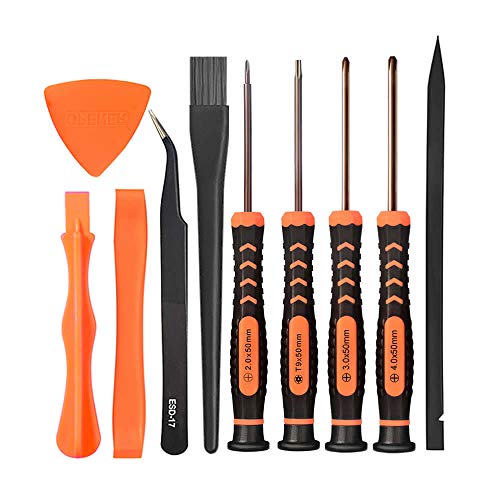
- PS5 console cleaning kit


Before You Start
Ensure the PS5 is powered off, unplugged, and completely cooled before cleaning. Use a soft, lint-free microfiber cloth to avoid scratching surfaces. Do not use abrasive cleaners, bleach, or ammonia-based solutions. Keep liquids away from vents and ports to prevent internal damage. Plan for 10–20 minutes of quiet time to complete dust removal without rushing.
Step-By-Step: How To Clean A PS5 Console And Accessories
- Power down the PS5 and unplug all cables, including HDMI and power cords.
- Detach any removable covers or accessories as needed and place the unit on a clean surface.
- Use the compressed air duster for electronics to blow dust from the exterior vents and fan grills. Hold the can upright and short bursts to avoid moisture.
- Wipe the flat surfaces with a dry microfiber cleaning cloth, following the grain if applicable.
- For stubborn smudges on the PS5 shell, lightly dampen a microfiber cloth with isopropyl alcohol (70% or higher) and wipe the area in gentle, circular motions. Do not saturate any area.
- Inspect ports and vents for clumps of dust; use the compressed air at an angle to dislodge debris without inserting objects.
- Clean any controller surfaces with the microfiber cloth, focusing on thumbsticks and buttons that accumulate oils.
- Wipe down the USB ports and the top of the console where dust tends to settle, ensuring all surfaces are dry before reconnecting cables.
- Reassemble any removed parts and reconnect cables only after the console is completely dry.
- Power on and verify that fans run smoothly and there are no unusual noises after cleaning.
- Schedule regular quick cleanings and consider dusting every few weeks in dry environments.
- Store cleaning tools in a safe, accessible place for future maintenance.
Troubleshooting
| Symptom | Likely Cause | Fix | Prevention |
|---|---|---|---|
| PS5 fans run loudly after cleaning | Residual dust in vents or fan | Re-clean vents with compressed air and inspect for debris | Dust regularly; keep area ventilated |
| Surface smudges remain after cleaning | Oil buildup from hands | Use a microfiber cloth lightly dampened with isopropyl alcohol | Avoid touching surfaces with dirty hands |
| Moisture spots on console | Excess liquid during cleaning | Wipe with dry cloth and allow to dry completely | Never apply liquids directly; use minimal moisture |
| Ports feel stiff or sticky | Silt or residue in connector gaps | Gentle air blasts and a soft cloth wipe | Clean in a dry environment; avoid liquids near ports |
Common Mistakes
- Spraying cleaner directly onto the PS5 or controllers
- Using abrasive brushes or rough cloths that scratch coatings
- Ignoring heat vents and leaving visible dust unaddressed
- Cleaning while the device is plugged in or powered on
Tips For Best Results
- Dust tends to accumulate most near the fan intake; focus cleaning efforts there.
- Clean on a non-carpeted surface to prevent extra dust from clinging to the console.
- Use short bursts of compressed air and keep the can upright to avoid moisture spray.
- Pair cleaning with routine maintenance, such as wiping controllers after long gaming sessions.
- Store cleaning supplies away from play areas to avoid accidental spills during use.
Call A Professional
Contact a professional if the PS5 shows signs of liquid damage, persistent overheating after cleaning, or if cleaning involves internal components beyond the vents. If you notice unusual smells, smoke, or power issues that cleansing cannot address, seek repair services immediately.
FAQ
Can I use water to clean the PS5?
Avoid water or any liquid directly on the console. Use dry or lightly dampened microfiber cloths with isopropyl alcohol when needed.
Is compressed air safe for PS5 cleaning?
Yes, when used in short bursts from a distance with the can upright and away from internal components.
How often should I clean my PS5?
Consider a quick dusting monthly and a deeper clean every 3–6 months, depending on environment and usage.
Are there parts I should not clean?
Avoid disassembling the internals or cleaning the motherboard. Stick to exterior shells, vents, and accessible ports.
Will cleaning void the warranty?
Normal external cleaning with recommended tools typically does not affect warranty, but avoid opening the device or using harsh chemicals.
What about cleaning PS5 accessories?
Clean controllers, cables, and the controller joysticks with a microfiber cloth; use compressed air to clear dust from ports and gaps.
Buying Guide
When choosing cleaning gear for the PS5, consider size and ergonomics of the tools, noise levels, and compatibility with electronics. A compact compressed air duster is convenient for hard-to-reach vents, while a high-quality microfiber cloth protects delicate surfaces. A dedicated PS5 console cleaning kit can streamline routine maintenance by combining brushes, dusters, and non-abrasive cloths in one package.
Key buying factors include:
- <bSize and ergonomics: Choose tools that are comfortable to hold and reach tight spaces without tipping the console.
- <bNoise level: Look for lower-noise dusters for a calmer cleaning session, especially in shared spaces.
- <bEnergy efficiency: Manual dusters require no power; battery-powered options should be energy-conscious and safe for electronics.
- <bControls and safety: Simple, spray-free dusters reduce the risk of moisture intrusion; ensure the product provides clear safety instructions.
- <bPlacement: Use a clean, stable surface away from food and liquids; keep cleaning tools organized to avoid cross-contamination.
Compare bundles that include a microfiber cloth set, a dedicated electronics cleaning kit, and a compressed air duster. Evaluate whether you prefer a kit that addresses screens, ports, and console shells together or if you want to pick tools separately for flexibility.
With the right tools and a calm approach, maintaining a clean PS5 becomes a quick, routine task that supports optimal performance and longevity for gaming sessions.
Leave a Reply